
Navigating the high-speed 2026 futures market requires more than just timing, it requires cost-efficiency. In a world where every basis point counts, professional traders don't just focus on the entry price; they focus on the execution type. On BingX, the Post-Only order is the primary tool for traders who want to ensure they provide liquidity to the market rather than taking it, effectively guaranteeing Maker fee rates.
As a top 5 global futures trading platform, BingX offers sophisticated order types that go beyond simple buys and sells. The Post-Only mechanism acts as a fail-safe for your trading bot or manual strategy, ensuring that you are never caught paying the higher Taker fees associated with market-matching orders. By mastering this tool, you can significantly reduce your overhead, especially when trading high volumes or executing frequent scalp trades.
This guide explores the mechanics of Post-Only orders, why they are essential for your bottom line, and how to deploy them effectively within the BingX Perpetual Futures interface.
What Is a Post-Only Order in Futures Trading and How Does It Work?
A Post-Only order is a specialized limit order that guarantees your trade will be added to the order book and not executed immediately against an existing order. In the world of crypto futures, orders that provide liquidity (adding to the book) are classified as Makers, while orders that consume liquidity (matching an existing order) are Takers.
The primary purpose of a Post-Only order is to ensure you always remain a Maker. If you place a standard limit order too close to the current market price, there is a risk that the market moves into your order the moment you click buy, turning you into a Taker and charging you a higher fee. With Post-Only enabled, the system performs a real-time check: if your order would match an existing trade immediately, the system automatically cancels the order instead of executing it.
In practice, this order type acts as a shield for your trading capital. It prevents accidental market entries during periods of high volatility or thin liquidity. By using Post-Only, you are signaling to the exchange that you only wish to trade if you can earn the lower Maker fee, providing a predictable cost structure for your trading business.
What Are the Top 5 Benefits of Using Post-Only Orders on BingX Futures?
Using Post-Only orders isn't just about saving a few cents; it's about professional-grade execution. Here is how it benefits your 2026 trading strategy:
- Guaranteed Maker Fees: BingX rewards liquidity providers with lower fee tiers. Post-Only ensures you never accidentally slip into a Taker fee bracket.
- Protection Against Slippage: Because Post-Only orders cannot execute immediately, you are never hitting the bid or lifting the offer, which protects you from entering at a sub-optimal price during a flash spike.
- Ideal for Automated Trading: If you use APIs or trading bots, Post-Only prevents your bot from chasing the price and racking up massive Taker fees during volatile swings.
- Order Book Visibility: Your order is guaranteed to appear on the depth chart, allowing you to influence the market spread rather than reacting to it.
- Risk Control in Fast Markets: If the market moves faster than your internet connection or the UI can update, Post-Only prevents you from buying at the top of a wick if that price is already being filled by others.
Post-Only vs. Standard Limit Orders: A Comparison
While both appear in the order book, their behavior upon submission is fundamentally different.
|
Feature |
Standard Limit Order |
Post-Only Order |
|
Execution |
Can execute immediately (Taker) or sit in book (Maker) |
Must sit in the order book (Maker) |
|
Fee Type |
Variable (Maker or Taker) |
Guaranteed Maker Fee |
|
Immediate Match |
Fills immediately at the best available price |
Automatically cancels the entire order |
|
Best For |
Getting filled quickly at a specific price |
Reducing costs and market-making strategies |
|
Visibility |
May never be seen by the book if filled instantly |
Always appears on the order book |
A Standard Limit Order prioritizes execution certainty at a specific price threshold but carries Execution Risk regarding fee structures. In high-volatility environments, a limit order placed near the spread has a high probability of matching instantly, incurring Taker fees of around 0.05% typically on BingX. This occurs because the order removes liquidity from the book. From a data perspective, standard limits are essential for aggressive entries where the trader values getting filled over the cost of the transaction, though they often suffer from slippage if the order size exceeds the immediate depth of the book.
In contrast, a Post-Only Order is a strategic cost-management tool that mathematically guarantees Maker fees of typically 0.02% on BingX, representing a 60% reduction in transaction overhead. By programmatically rejecting any match that would result in a Taker execution, it ensures the order only adds to the order book's depth. Practically, this is vital for market makers and high-frequency scalpers whose edge is thinner than the fee spread. While it eliminates the risk of accidental market entries, the trade-off is Fill Risk: if the market moves away or through your price too quickly, the order is canceled, potentially leaving the trader without a position during a major breakout.
How to Place a Post-Only Order on BingX Futures: Step-by-Step Guide
BingX has integrated Post-Only functionality directly into the Perpetual Futures trading terminal for ease of use.
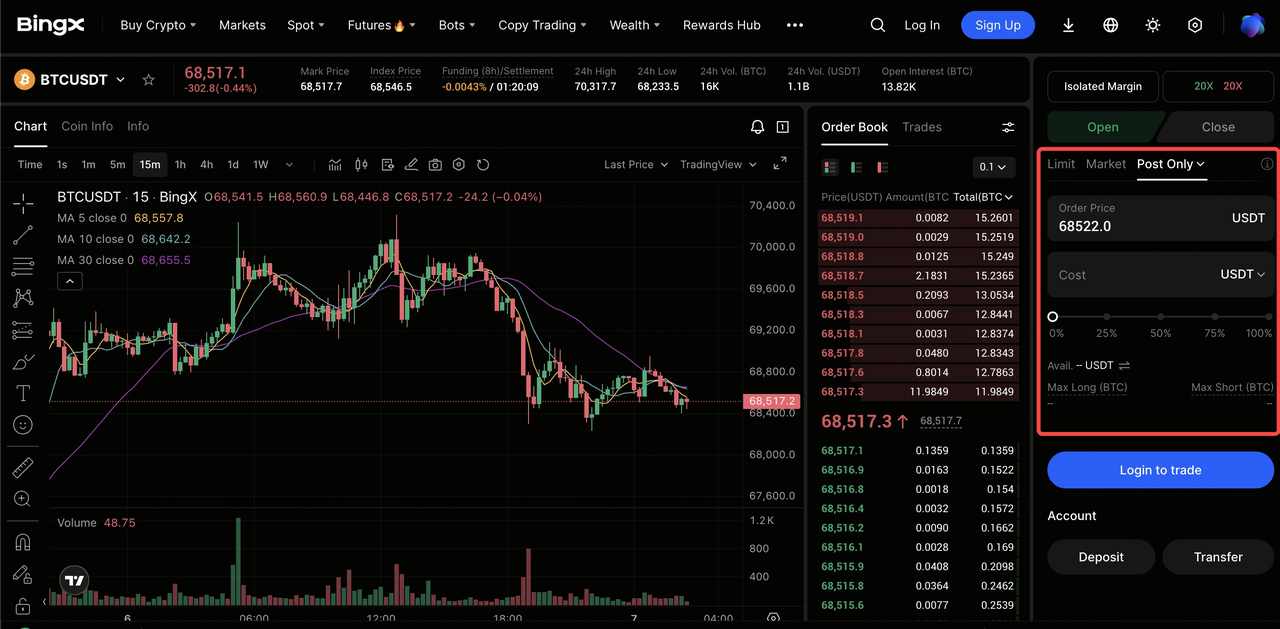
Placing a Post-Only Order on BingX Web and App
- Navigate to Futures: Open the Perpetual Futures trading pair of your choice, e.g., BTC/USDT perps.
- Select Limit Order: Post-Only is an extension of the Limit Order type. You cannot use it with Market orders.
- Enable Post-Only: Look for the advanced options or a checkbox labeled Post-Only within the order entry panel.
- Set Your Price: Enter a price that is slightly away from the current Last Price to increase the chance of it being posted to the book.
- Execute: Click Open Long or Open Short.
Pro Tip: If your order disappears immediately after clicking buy, check your Canceled Orders history. This usually means the market moved into your price before the order hit the book, and the Post-Only safety mechanism triggered a cancellation to save you from Taker fees.
Top Trading Strategies with Post-Only Orders for Professional Traders
Use Post-Only orders on BingX Futures to consistently earn maker fees, control execution, and avoid unnecessary slippage in fast-moving markets.
- Scalp With Fee Efficiency: If you trade short-term price movements, Post-Only helps you stay profitable by ensuring every entry is a maker order, minimizing fees and maximizing edge in high-frequency setups.
- Build Large Positions Strategically: When placing large orders, Post-Only prevents your trade from crossing the spread and triggering taker fees. This allows you to layer liquidity (build walls) gradually without impacting market price.
- Exploit Mark Price vs. Last Price Gaps: Monitor the difference between Mark Price and Last Price. When a gap appears, place Post-Only orders near the Mark Price to capture potential mean reversion while avoiding costly taker executions.
Conclusion: Optimizing Your Bottom Line with Post-Only Orders on BingX
The Post-Only order serves as a critical cost-management tool for traders who prioritize "Maker" status to maintain a competitive edge. By ensuring your orders only add to the order book's depth, you can systematically reduce transaction overhead by up to 60% compared to standard taker fees. This is particularly effective for high-frequency strategies and market-making, where the cumulative impact of fees often dictates the boundary between a profitable and a break-even account. In the 2026 trading landscape, utilizing Post-Only allows you to maintain precise control over your execution costs and avoid the accidental market entries that frequently occur during thin liquidity or rapid price shifts.
However, traders must balance fee optimization with Fill Risk. Because a Post-Only order will automatically cancel if the market moves into your price too quickly, there is a possibility of missing an entry during a high-momentum breakout.
Risk Reminder: Trading perpetual futures involves significant market risk and the potential for loss. While Post-Only orders reduce fees and slippage, they do not protect against market directionality or liquidation. Always utilize a comprehensive risk management strategy, including the use of stop-losses and the BingX Futures Calculator, to manage your margin levels effectively before deploying live capital.
Related Reading
- How to Get Started with Perpetual Futures Trading on BingX: A 2026 Beginner's Guide
- What Are the Different Order Types Supported on BingX Futures and How to Use Them?
- What Is Mark Price in Futures Trading and How to Use It on BingX Futures?
- What Is Limit Order in Futures Trading and How to Use It on BingX Futures? A 2026 Guide
- What Is Market Order in Futures Trading and How to Use It on BingX Futures? A 2026 Guide
FAQs on Post-Only Orders in Futures Trading
1. Why was my Post-Only order canceled immediately?
Your order was canceled because the price you set matched an existing order on the book. To avoid charging you a Taker fee, BingX automatically canceled the order. Try placing your order slightly further away from the current price.
2. Can I use Post-Only for Take-Profit or Stop-Loss?
Post-Only is typically used for opening or adding to positions. While you can use it for closing, most traders prefer standard Limit or Market orders for Stop-Losses to ensure they exit the market when necessary, regardless of the fee type.
3. Does Post-Only affect the speed of my trade?
Yes. Since Post-Only orders cannot fill immediately, they may take longer to execute than a standard limit order, as you must wait for the market to move and hit your order.
