Navigating the 2026 spot market requires more than just identifying the right asset; it requires a surgical approach to how you enter and exit the market. On BingX, the choice between a Market Order and a Limit Order is the foundational decision that dictates your role in the exchange’s ecosystem. Whether you are chasing a rapid breakout with fill-now urgency or patiently waiting for a specific dip with fill-later precision, your selected order type is your primary tool for capital efficiency.
As a leading global exchange, BingX provides these order types to suit both high-frequency institutional traders and retail beginners. By mastering the mechanics of each, you can trade with higher confidence, choosing between the speed of a taker or the cost-effectiveness and price control of a maker.
This guide breaks down exactly how market and limit orders work on BingX spot market, the mathematical impact of slippage, the key differences between Market and Limit logic, and how to strategically select the right tool for different market environments in 2026.
What Is a Market Order and How Does It Work on BingX Spot?
A Market Order is an instruction to buy or sell an asset immediately at the best available price currently in the order book. In this configuration, the trader prioritizes execution speed over price precision. Because Market Orders take liquidity away from the book by matching against existing orders, the trader is considered a Taker.
Slippage and the Taker Reality in Spot Trading
When executing a Market Order, the price you see on the chart (the Last Price) may not be the price you receive. This discrepancy is known as Slippage.
- The Liquidity Factor: If you place a large market buy order in a thin market, the engine will eat through multiple price levels in the order book to fill your quantity.
- Price Deviation: Your final Volume-Weighted Average Price (VWAP) will be higher for buys or lower for sells than the initial ticker price. On BingX, slippage typically ranges from 0.01% in high-volume pairs like BTC/USDT to over 2% in low-liquidity altcoin markets.
What Is a Limit Order and Why Use It on BingX Spot?
A Limit Order allows you to set a specific price at which you are willing to buy or sell. The order only executes if the market price reaches your specified target or better. By placing a Limit Order, you are making the market, adding liquidity to the order book and waiting for a counterparty to match your price.
What Are the Key Advantages of Limit Orders?
Unlike Market Orders, where execution is guaranteed but price is not, Limit Orders offer price certainty at the cost of execution speed.
- Total Price Control: You specify the exact entry or exit point. For example, if BTC is trading at $71,000 but you only want to buy at $70,000, your limit order will sit in the book until that price is hit.
- Maker Fee Efficiency: On BingX, Limit Orders are usually treated as Maker orders, which often carry lower trading fees than Taker (Market) orders, rewarding you for providing liquidity to the exchange.
- No Slippage: A Limit Order guarantees that you will never pay more or receive less than your specified price.
What Are the Key Differences Between Market Orders and Limit Orders?
The primary distinction between these two orders lies in the trade-off between certainty of price and certainty of execution.
|
Feature |
Market Order |
Limit Order |
|
Execution Speed |
Instantaneous: Fills immediately at the best available price. |
Variable: Can take seconds, hours, or may never fill. |
|
Price Control |
Low: You accept whatever the current market price is. |
High: You dictate the exact price or better. |
|
Certainty of Fill |
High: Almost guaranteed to fill as long as there is liquidity. |
Low: Only fills if the market reaches your specific target. |
|
Fee Category |
Taker: Typically carries higher fees for removing liquidity. |
Maker: Often carries lower fees for adding liquidity. |
|
Slippage Risk |
High: Large orders can sweep the book, leading to worse prices. |
Zero: Guaranteed to fill at your price or a better one. |
|
Market Role |
Liquidity Taker: Removes active orders from the book. |
Liquidity Maker: Adds a resting order to the book. |
|
Best Scenario |
Panic buying/selling or high-urgency entries. |
Strategic entries at support or buying the dip. |
Market Orders operate on a fill-now basis. They are designed for traders who prioritize time sensitivity, such as exiting a position during a sudden crash or entering a mooning asset before the next leg up. While they ensure you are in the trade instantly, they expose you to the Taker fee and the invisible costs of slippage.
In contrast, Limit Orders operate on a fill-later basis. They enter the Central Limit Order Book (CLOB) and wait for the market's price discovery mechanism to match them. While this eliminates slippage and secures lower fees, it carries the risk of opportunity cost; if the market moves within one cent of your limit price and then reverses, your order will remain unfilled, and you will miss the move entirely.
How to Place Market and Limit Orders on BingX
Executing a trade on BingX is a streamlined process designed for speed on mobile and precision on the web.
How to Set Market and Limit Orders on BingX Web
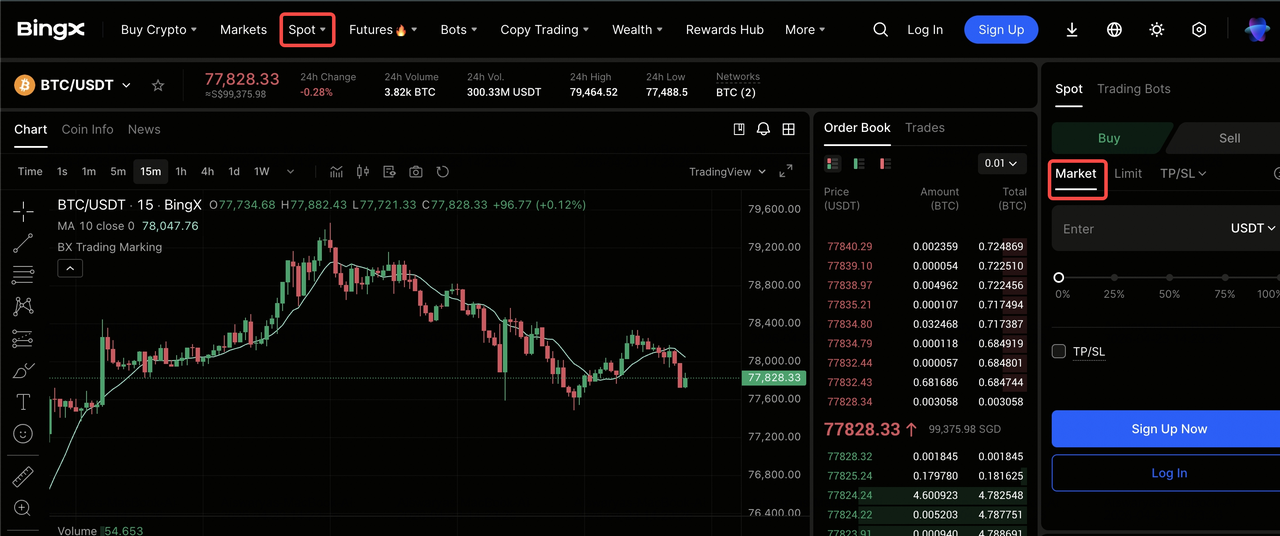
1. Once you have navigated to the Spot trading terminal, locate the order panel on the right side of the screen and select either the Limit or Market tab.
2. For a Limit Order, enter your specific target price and the amount of crypto you wish to buy or sell; for a Market Order, simply enter the total amount of USDT you wish to spend.
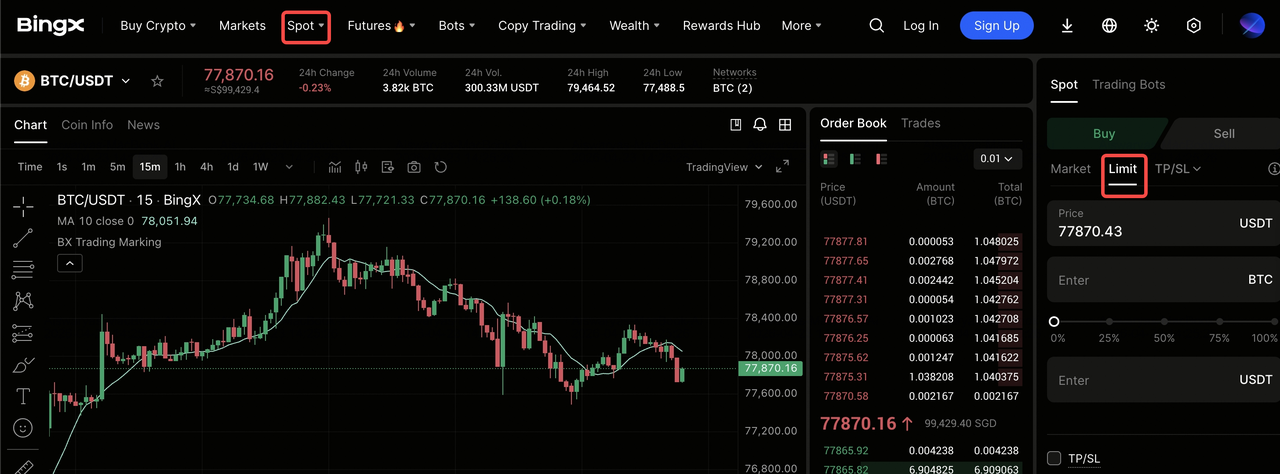
3. After reviewing your details, click the green Buy or red Sell button to send your order directly to the matching engine.
How to Choose Market or Limit Orders on the BingX App
1. On the mobile app, tap the Spot icon in the bottom navigation bar and ensure your desired trading pair is selected at the top left.
2. Tap the dropdown menu currently displaying your order type (it defaults to Limit) to switch between Limit and Market modes.
3. Input your price for Limit and quantity, then tap the large Buy or Sell button at the bottom of the screen to execute your trade instantly or place it into the order book.
When to Use Market Orders vs. Limit Orders
Selecting the right order type is a strategic decision that should align with the current volatility profile of the market and your specific trade goals.
- The Breakout Chase (Market): Use Market Orders when a confirmed breakout is occurring on high volume and you cannot afford to wait. The potential profit of being in the trade outweighs the minor cost of slippage.
- The Catch the Dip Strategy (Limit): Use Limit Orders to set resting buys at key technical support levels. This allows you to capture the best possible price during a flash wick without needing to be at your screen.
- Low Liquidity Environments: Avoid Market Orders on small-cap altcoins with thin order books. A large market order here can sweep the book, resulting in a disastrous entry price. Always use Limit Orders for assets with low daily volume.
- Professional Fee Management: If you are a high-frequency trader, consistently using Limit Orders can significantly reduce your overhead by keeping you in the Maker fee tier.
Conclusion: Establishing a Surgical Spot Trading Framework
The choice between Market and Limit orders on BingX is a strategic pillar of a reusable trading framework. Market Orders provide the necessary speed for urgent execution and time-sensitive opportunities, whereas Limit Orders offer the surgical precision required for cost-effective entries and long-term portfolio stability.
Risk Reminder: While order types are tools for execution, they do not eliminate the inherent risks of market volatility. A Limit Order may never be filled, and a Market Order in a volatile environment can lead to significant slippage. Traders are encouraged to use the BingX Demo Account to practice reading order book depth and to always utilize Stop-Loss orders to protect their collateral.
Related Reading
- How to Use Order Book Depth and Market Data for Bitcoin Trading
- Best 10 Crypto Spot Trading Platforms for Beginners in 2026
- How to Buy and Sell Crypto on the BingX App: A Step-by-Step Guide (2026)
- What Is Trading Psychology: How to Control Emotions and Trade Rationally
- What Is Slippage in Crypto and How Does BingX Guarantee Exact Prices?
FAQs on Market and Limit Orders in Spot Trading
1. Why was my Limit Order only partially filled?
This occurs when the market hits your price, but there isn't enough counterparty volume to fill your entire request. The remaining portion of your order stays in the book until more liquidity arrives or you cancel it.
2. Can a Limit Order be executed as a Taker?
Yes. If you set a Buy Limit order above the current market price or a Sell Limit below it, the BingX engine will match it instantly against the existing book. In this case, you will pay the higher Taker fee.
3. Does BingX protect against extreme slippage for Market Orders in the spot market?
Yes. BingX has built-in slippage protection that may prevent a Market Order from executing if it would move the price beyond a certain percentage, protecting you from scam wicks or erroneous order book gaps.
