

Solana Mobile’s Seeker (SKR) airdrop went live on January 21, 2026, letting eligible Seeker Season 1 users and developers claim SKR directly inside the Seed Vault Wallet on the Solana Seeker phone. According to official updates from Solana Mobile, over 100,000 users and 188 developers are eligible, with nearly 2 billion SKR distributed to the community at launch.
This guide walks you through confirming Seeker airdrop eligibility, claiming your SKR tokens safely, and transferring SKR to BingX so you can trade, plus practical tips to avoid common mistakes during high-traffic airdrop periods.
What Is Solana Seeker and What Does the SKR Token Do?
Solana Seeker is a blockchain-native Android smartphone built by Solana Mobile that integrates wallets, dApps, and on-chain identity directly into the device. Since launch, Solana Mobile has reported around 150,000 Seeker preorders, with devices shipping to over 50 countries, signaling strong global demand.
During Seeker Season 1, the ecosystem saw hundreds of dApps launched, millions of on-chain transactions processed, and billions of dollars in cumulative volume, reinforcing the thesis of a mobile platform where users and developers own and participate in the network, rather than relying on traditional app-store gatekeepers.
At the heart of this ecosystem is SKR, an SPL token on Solana that serves multiple utility and governance functions:
• Governance: SKR holders can vote on ecosystem decisions, including app curation and incentive structures.
• Staking & Rewards: Users can stake SKR immediately after claiming and begin earning rewards via 48-hour inflation events with zero commission at launch.
• Economic Alignment: SKR aligns incentives between Seeker users, developers, ecosystem “Guardians,” and hardware partners, rewarding participation and contribution.
• Ecosystem Incentives: Nearly 2 billion SKR or 20% of the 10 billion total supply was airdropped to eligible Seeker users and developers, creating a shared stake in network growth.
Together, Seeker and SKR form a mobile Web3 ecosystem where ownership, participation, and governance are tied directly to on-device activity and community engagement.
What Is the Seeker (SKR) Airdrop?
The Seeker (SKR) airdrop is Solana Mobile’s community distribution of the SKR token, designed to reward early participation in the Seeker mobile ecosystem. Launched on January 21, 2026, the airdrop allocates nearly 2 billion SKR tokens, about 20% of the 10 billion total supply, to over 100,000 Seeker phone users and eligible developers who participated in Seeker Season 1.
Eligible users can claim directly on their Seeker device by opening Seed Vault Wallet and navigating to the Activity Tracking tab. You’ll need around 0.015 SOL in your wallet to cover the network fee. The claim window is 90 days, and any unclaimed SKR will return to the airdrop pool after April 20, 2026, according to Solana Mobile. SKR is an SPL token on the Solana network, and the official contract address is SKRbvo6Gf7GondiT3BbTfuRDPqLWei4j2Qy2NPGZhW3; always verify this before interacting or transferring funds.
How to Claim SKR Tokens on Seeker Phone: Step-by-Step Guide
Claiming your Seeker (SKR) airdrop is a quick, on-device process that takes under a minute if your wallet is ready.
1. Open your Seeker phone and launch the Seed Vault Wallet
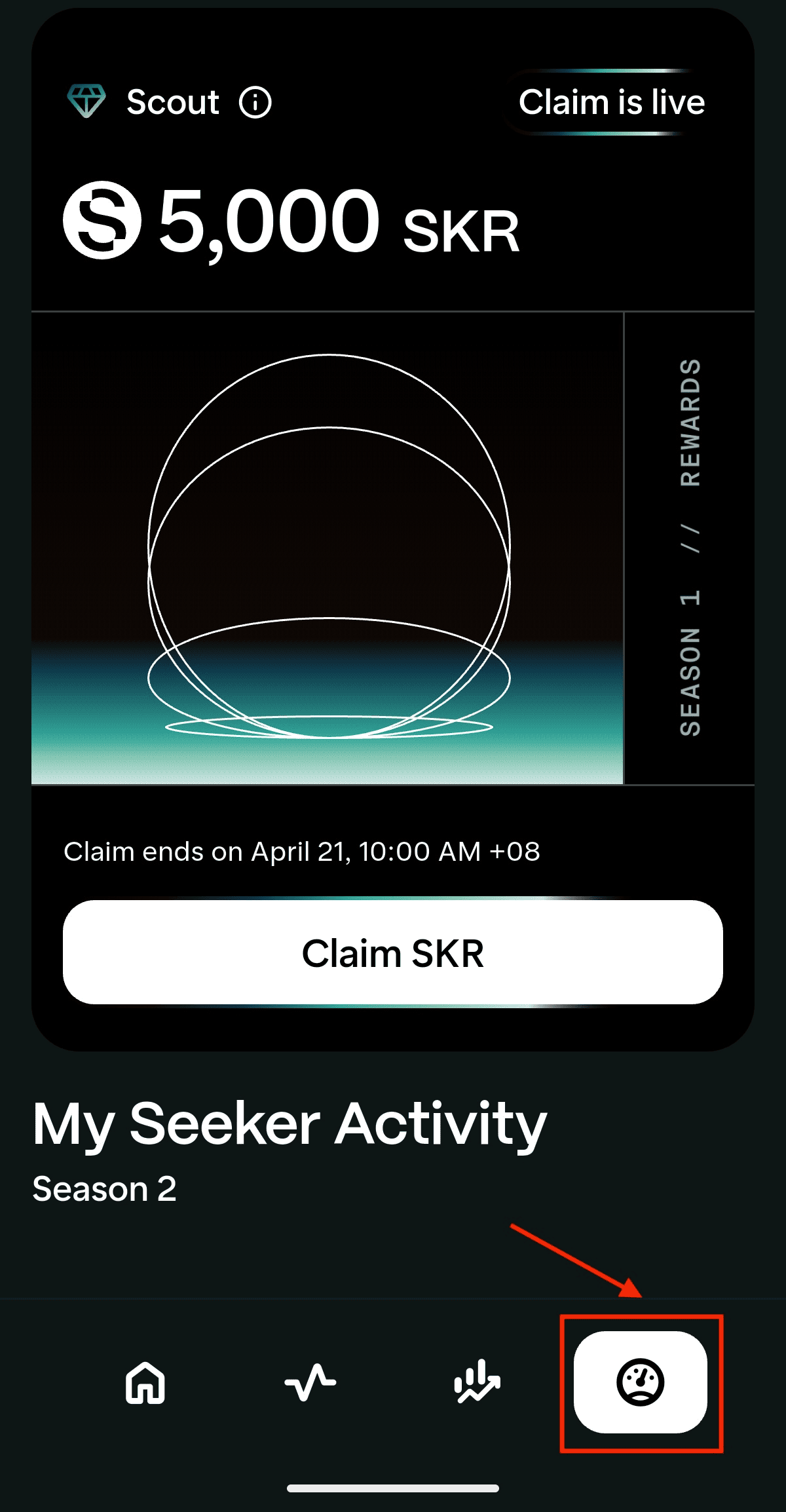
2. Go to the Activity Tracking tab
3. Tap “Claim SKR” and approve the transaction
4. Ensure your wallet has around 0.015 SOL to cover the Solana network fee
5. Once confirmed, SKR is credited directly to your wallet and can be staked or transferred immediately
For developers: If you shipped a qualified app to the Solana Mobile dApp Store during Seeker Season 1, claim your SKR via the Publishing Portal, as outlined by Solana Mobile.
Optional: How to Stake SKR If You’re Holding Long-Term
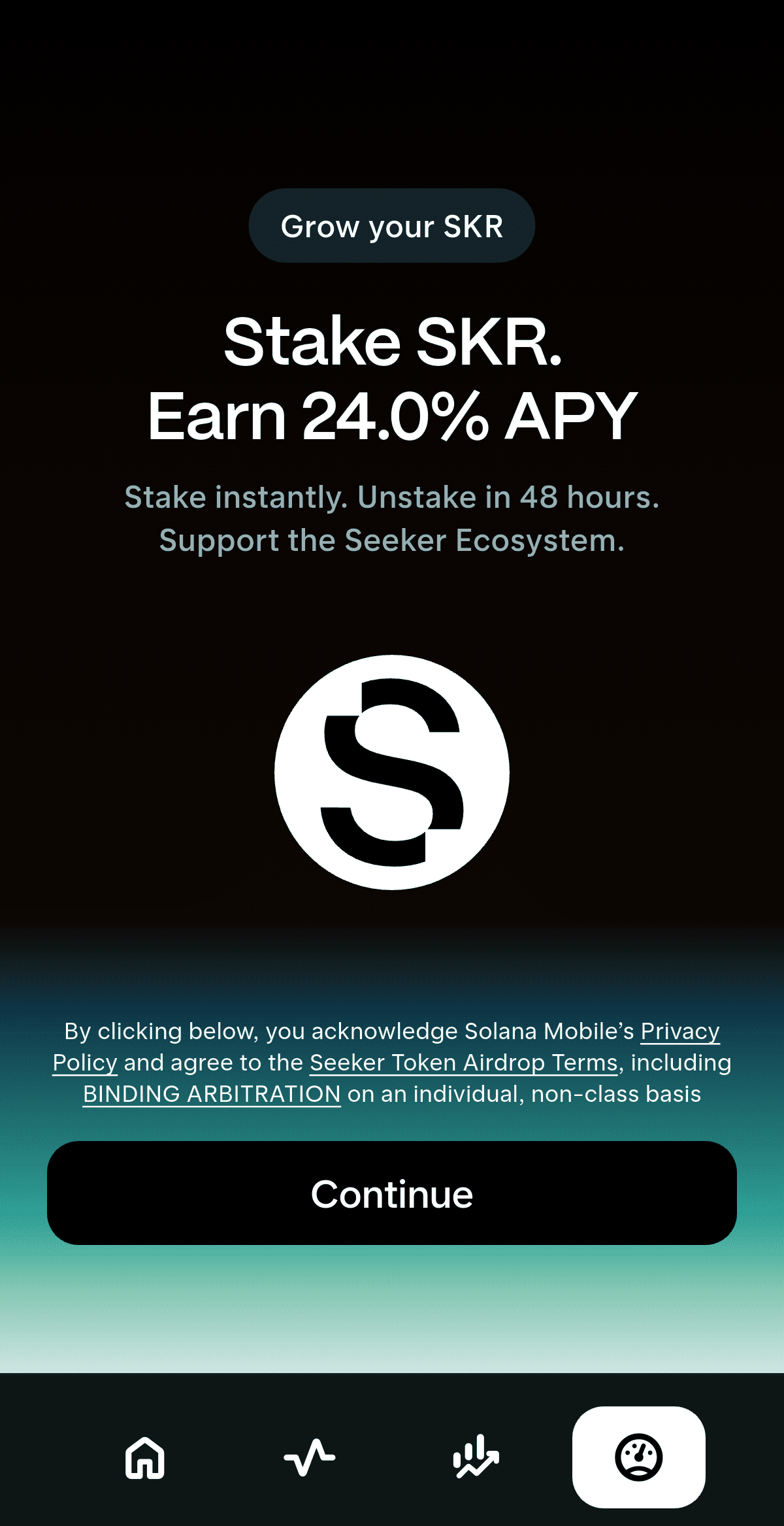
Solana Mobile enables staking right after you claim. At launch, staking is advertised with 0% commission, and rewards are distributed via inflation events every 48 hours.
1. Claim SKR first in Seed Vault Wallet, since you can’t stake what you haven’t received.
2. Open Seed Vault Wallet on your Seeker and go to SKR Staking.
3. Choose a Guardian/validator, or use the default option if prompted.
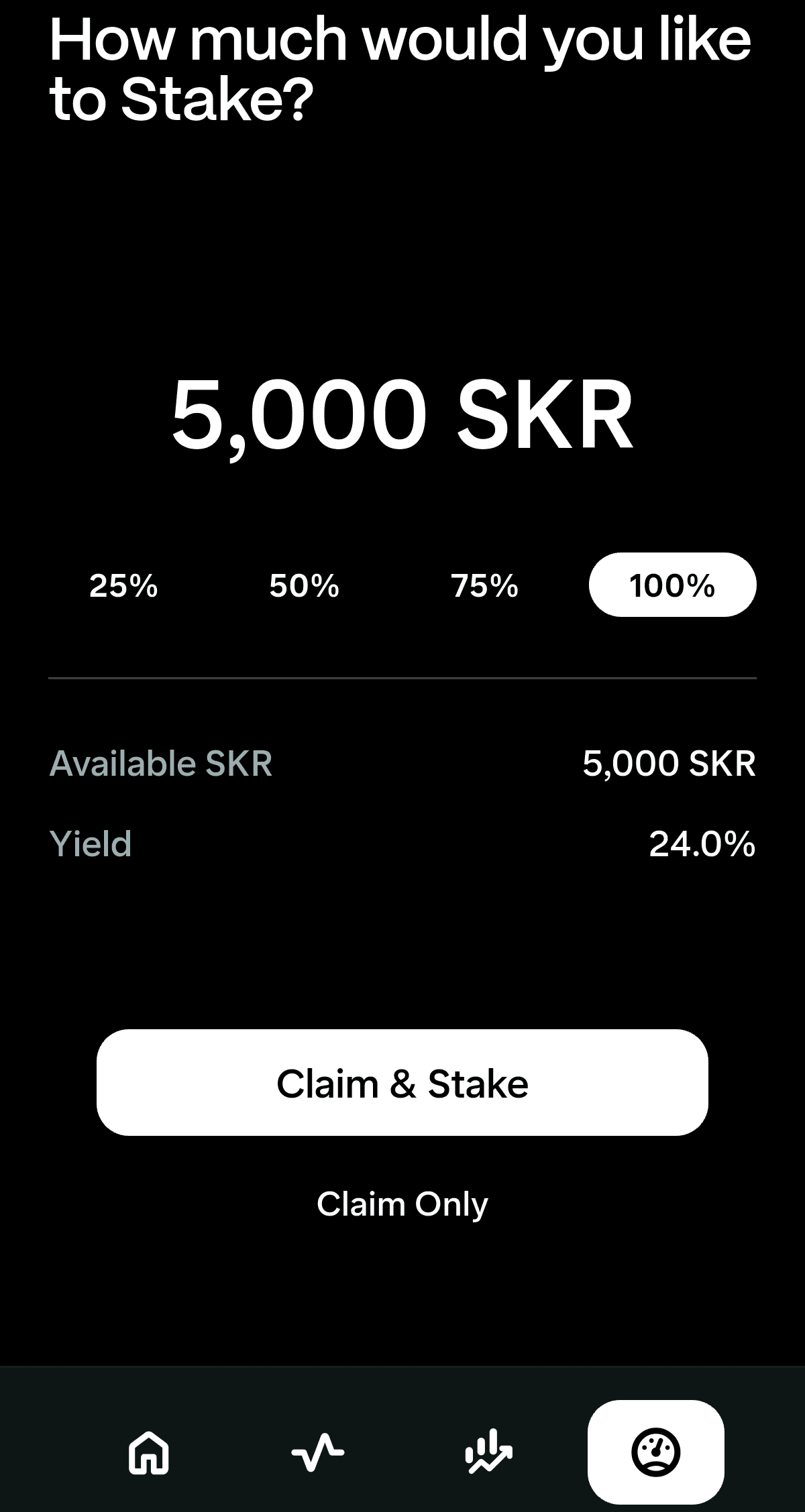
4. Enter the amount of SKR you want to stake, then confirm the transaction.
5. Your staking begins right away, and you start earning at the next inflation event (every 48 hours). At launch, staking is advertised with 0% commission.
If you want to stake on desktop instead, you can visit the official SKR staking portal, connect your wallet, select a Guardian, enter your SKR amount, and confirm.
Unstaking rule to remember: You can unstake anytime, but there’s a 48-hour cooldown before funds become withdrawable. During this cooldown, your SKR typically stops earning rewards, and you’ll need to complete the withdrawal once the cooldown ends.
How to Withdraw SKR to BingX for Trading: A Beginner's Guide
After claiming your SKR tokens, BingX offers a simple and beginner-friendly way to access liquidity without leaving the ecosystem. With deep spot-market liquidity, fast deposits on Solana, and clear wallet routing, BingX makes it easy to move SKR from your Seed Vault Wallet and start trading within minutes. The platform also integrates BingX AI tools, which help users spot market trends, assess momentum, and manage risk, useful during volatile post-airdrop trading phases.
For new and experienced traders alike, BingX combines easy onboarding, real-time analytics, and AI-powered insights, making it a practical venue to trade SKR once your tokens are claimed and ready to deploy. Here's how to withdraw and trade SKR on BingX after claiming the Seeker token airdrop:
1. Get Your SKR Deposit Address on BingX
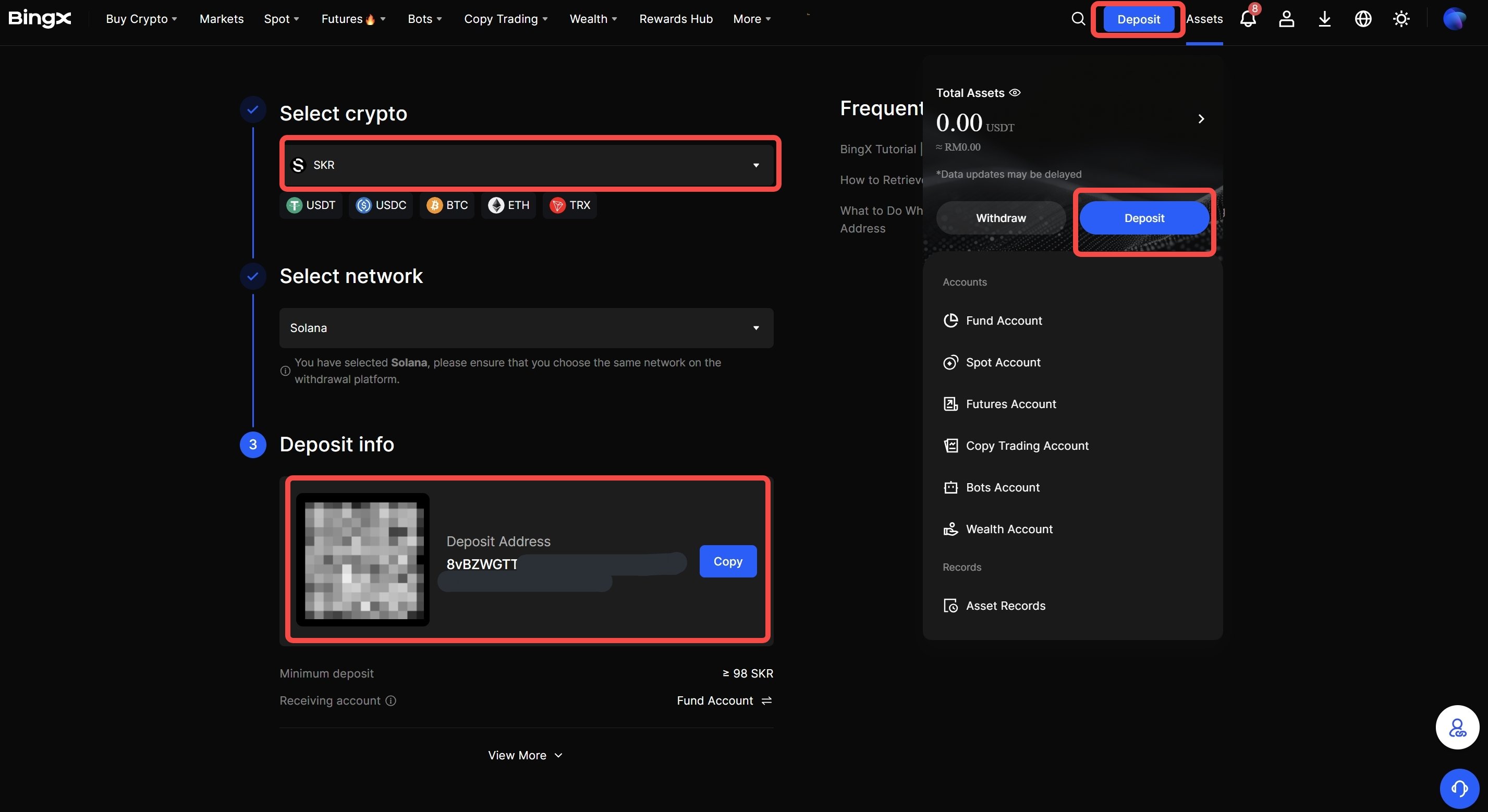
On BingX, you can get your SKR deposit address by following these steps:
• Open Assets, and click Deposit
• Choose the cryptocurrency and network
• Copy the deposit address
Important: SKR is a Solana SPL asset, so you must select the Solana network to avoid lost funds.
2. Send SKR From Your Seeker Phone's Seed Vault Wallet to BingX
• In Seed Vault Wallet, choose Send/Transfer
• Paste your BingX deposit address
• Enter the amount of SKR
• Confirm and send
Safety checks before you hit send
• Confirm the token is SKR and the address format is Solana
• Verify you’re using the official SKR mint when viewing SKR on explorers:
SKRbvo6Gf7GondiT3BbTfuRDPqLWei4j2Qy2NPGZhW33. Confirm Receipt of SKR Tokens on BingX and Start Trading
Once the transfer confirms, your SKR should show in your BingX balance. Then you can move it to the relevant account like Trading or Funding to place your trade.
4. Sell, HODL, or Buy More SKR on BingX Spot Market
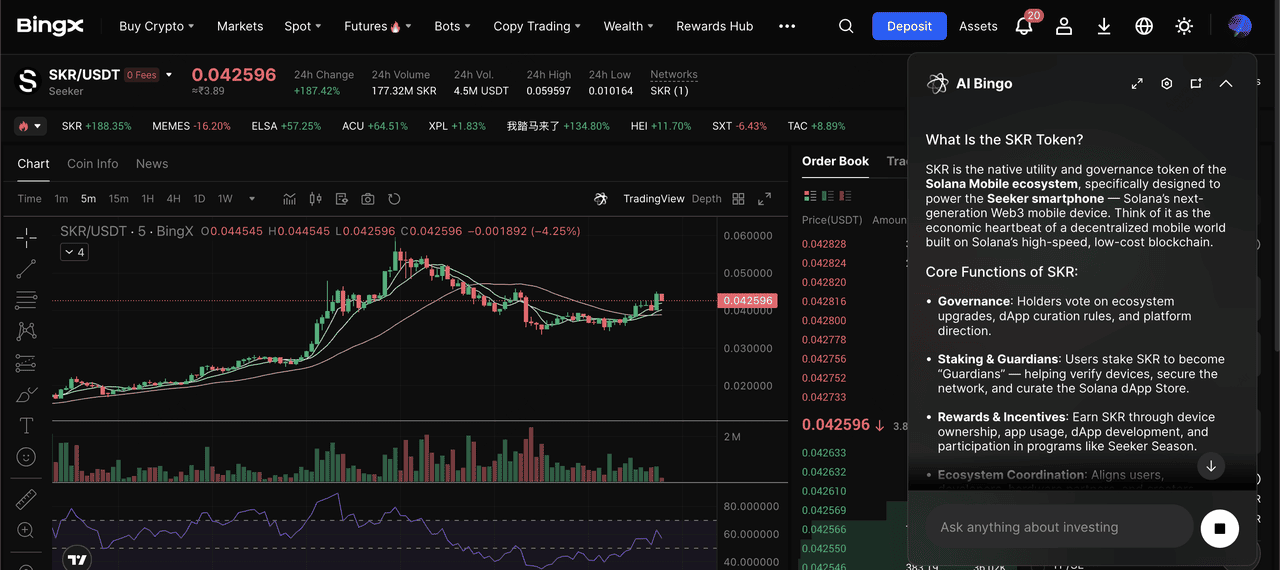
SKR/USDT trading pair on the spot market powered by BingX AI insights
Spot trading is best suited for users seeking direct exposure without leverage:
• Ensure your SKR tokens are credited to your BingX Spot wallet
• Go to the Spot Market on BingX
• Search for SKR and select the SKR/USDT trading pair
• Choose a Market order for instant execution or a Limit order to set your price
• Enter the amount and confirm the trade
Learn more about how to buy and sell SKR on BingX in our comprehensive guide.
5. Trade SKR with Leverage on BingX Futures Market
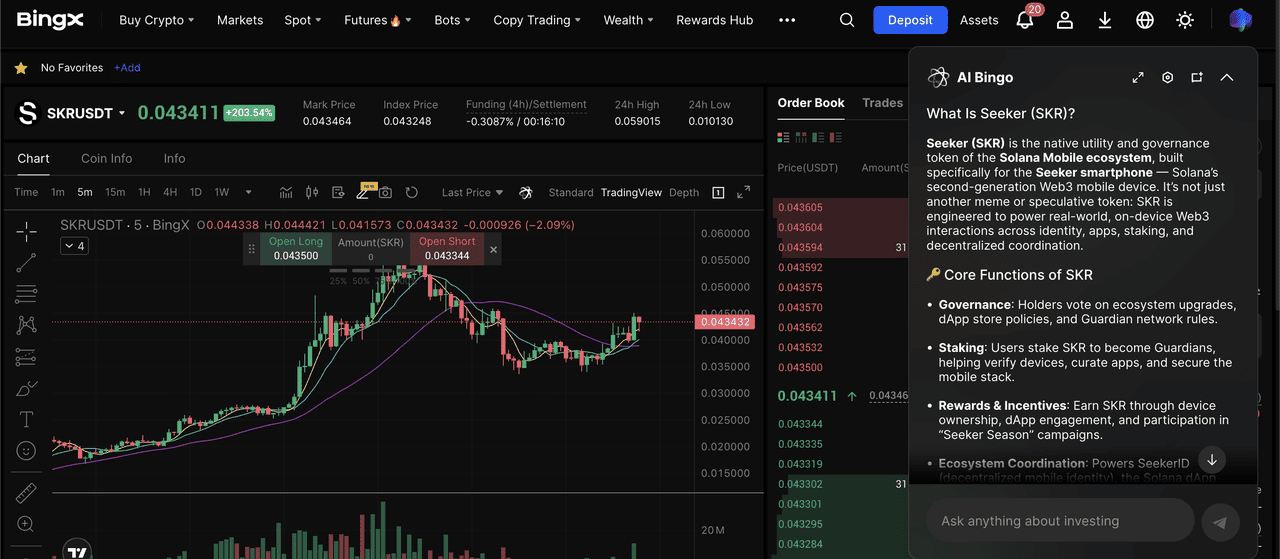
SKR/USDT perpetual contract on the futures market with BingX AI
1. Transfer USDT to your Futures account
2. Open Futures, head to USD-Margined perpetual futures and select the SKR perpetual contract
3. Choose Isolated margin for better risk control
4. Set leverage conservatively, especially during post-airdrop volatility
5. Go Long (price up) or Short (price down) and place your order
6. Always set stop-loss and take-profit to manage downside risk
Common Mistakes to Watch When Claiming SKR Token Airdrop
To protect your SKR allocation and avoid unnecessary losses, follow these practical checks before and after claiming. SKR’s claim flow is fully on-device, which makes it safer, but only if you stick to the official process.
1. Do not click links or visit websites: Unlike many Solana airdrops, SKR does not require logging into any website. Any message, DM, or post asking you to click a link to claim SKR is very likely a scam. Claims are done only inside the Solana Seeker phone wallet.
2. Use the correct claim path: Open your Seeker phone, launch Seed Vault Wallet, tap the right-side menu or Activity Tracking section, and you’ll see your SKR allocation directly, no redirects, no signatures outside the wallet.
3. Don’t miss the deadline: You have 90 days to claim. According to Solana Mobile, any unclaimed SKR will return to the airdrop pool after April 20, 2026. Set a reminder so you don’t lose your allocation.
4. Keep a small SOL balance ready: Make sure your wallet holds around 0.001–0.01 SOL to cover the Solana network fee, or the claim will fail.
5. Verify the real SKR token: Only interact with the official SKR mint address published by Solana Mobile. Fake SKR tokens and copycat tickers often appear during high-profile airdrops.
6. Plan for volatility after claiming: Airdrop tokens like SKR often experience sharp price swings as zero-cost recipients take profits while new buyers FOMO in. Avoid going all-in at peak volume, and size trades conservatively.
Sticking to the on-device claim flow, keeping a small SOL buffer, and ignoring external links are the simplest ways to claim SKR safely and make better decisions afterward.
Conclusion
The Seeker (SKR) airdrop represents a direct ownership stake in the Solana Mobile ecosystem, rewarding early users and developers who participated in Seeker Season 1. With SKR now live on major centralized exchanges and Solana DEXs, and supported by short-term incentives such as Jupiter’s $50,000 SKR trading campaign, liquidity and visibility have increased significantly, making it easier for recipients to stake, hold, or trade their allocation.
That said, claiming SKR is not just about near-term market activity. The token is designed for governance, staking, and long-term ecosystem participation, and its value will ultimately depend on Seeker phone adoption, developer growth, and sustained on-chain usage. As with all airdrops, prices can be volatile, especially as zero-cost tokens enter the market. Claim your allocation within the deadline, understand the risks, and decide whether SKR fits your strategy, whether that means holding for ecosystem exposure or trading responsibly once liquidity stabilizes.
