

Mining Bitcoin with a home PC is one of the most persistent myths in crypto. In 2026, it’s technically possible but almost never profitable. Modern Bitcoin mining is dominated by industrial ASIC farms, with the network hash rate hovering around 1,000+ exahashes per second (EH/s) and difficulty above 140 trillion.
This guide explains what Bitcoin mining on PC really means in 2026, how you can still use your computer to participate via marketplaces like NiceHash or mining altcoins, why true BTC mining requires ASICs, and how to move any mined Bitcoin to BingX to trade, hedge, or cash out.
Can You Still Mine Bitcoin on a PC in 2026?
You can run mining software on a PC in 2026, but you cannot realistically compete for Bitcoin block rewards. The Bitcoin network runs at over 1,000 EH/s, powered almost entirely by ASIC machines that deliver terahashes per second at far higher efficiency than any CPU or GPU. A gaming PC contributes a microscopic fraction of this hash power, so your expected BTC rewards are effectively zero once electricity costs are included.
In other words: PC mining is now educational, not a serious way to earn income. If you still want to try it, the practical route is to mine other Proof-of-Work coins with your PC and have a platform like NiceHash or Cryptex pay you in Bitcoin.
Short answer: You can still experiment with Bitcoin-related mining on a PC in 2026. You should not expect meaningful profit. For most users, buying BTC on BingX is simpler and financially smarter.
What Is Bitcoin Mining and How Does It Work?
Bitcoin mining is the process that keeps the Bitcoin network running securely. It uses a system called Proof of Work (PoW), where thousands of miners compete to solve mathematical puzzles using specialized computers. The first miner to find a valid solution earns the block reward, currently 3.125 BTC, plus transaction fees, and a new block is added to the blockchain. To keep blocks arriving every 10 minutes, the network automatically adjusts the difficulty depending on how much total computing power, known as hashrate, is online.
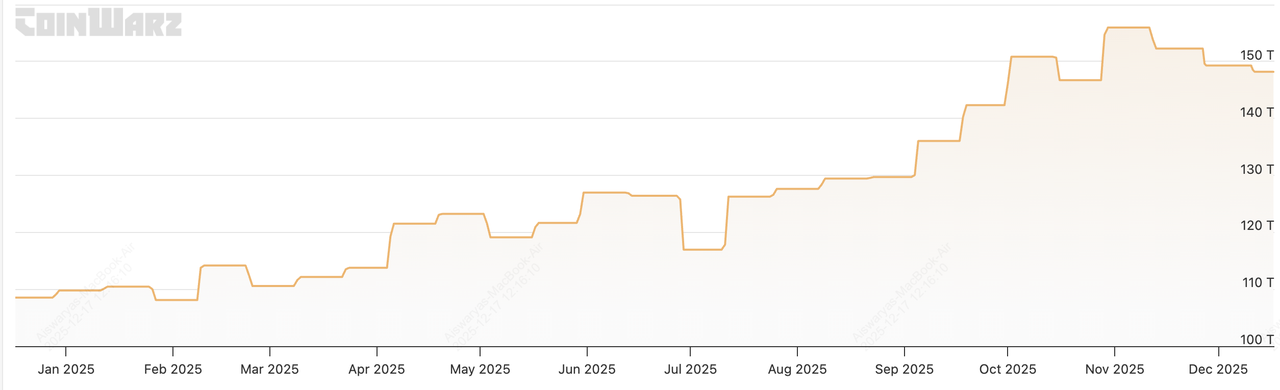
Bitcoin mining difficulty | Source: CoinWarz
By December 2025, Bitcoin’s mining landscape had become extremely competitive:
• Network hash rate: 1.085 ZH/s (zettahashes per second), or 1,085 EH/s, meaning the global mining network performs more than a sextillion (10²¹) hashes per second.
• Mining difficulty: 148.20 trillion, a 25% increase from 2024, making it harder than ever to mine a block.
• Daily mining rewards: 450 BTC/day, worth over $38 million/day at a BTC price of $86,000.
Almost all this hash power comes from ASIC miners, machines built solely for Bitcoin’s SHA-256 algorithm. Major mining pools such as Foundry USA, AntPool, ViaBTC, and F2Pool collectively control well over half of this global hash rate, illustrating how industrialized mining has become.
To understand the performance gap:
• A modern ASIC like a WhatsMiner M63S Hydro delivers 390 TH/s while consuming 7,215 watts, earning roughly $14.31/day in revenue and $5.65/day in profit at an electricity rate of $0.05/kWh.
• By contrast, a high-end gaming GPU may produce only a few megahashes (MH/s) or gigahashes at extremely low efficiency, tens of thousands of times weaker than ASICs.
This is why:
• ASIC mining farms with cheap electricity remain competitive.
• Home PCs are effectively non-competitive for direct BTC mining and cannot meaningfully contribute to the 1+ zettahash network.
For beginners, this means that mining Bitcoins on your PC in 2026 is no longer about actually finding BTC blocks; it’s about learning how mining works, using mining marketplaces like NiceHash, or mining smaller coins and converting them to Bitcoin later.
Is Mining Bitcoin on PCs Profitable in 2026?
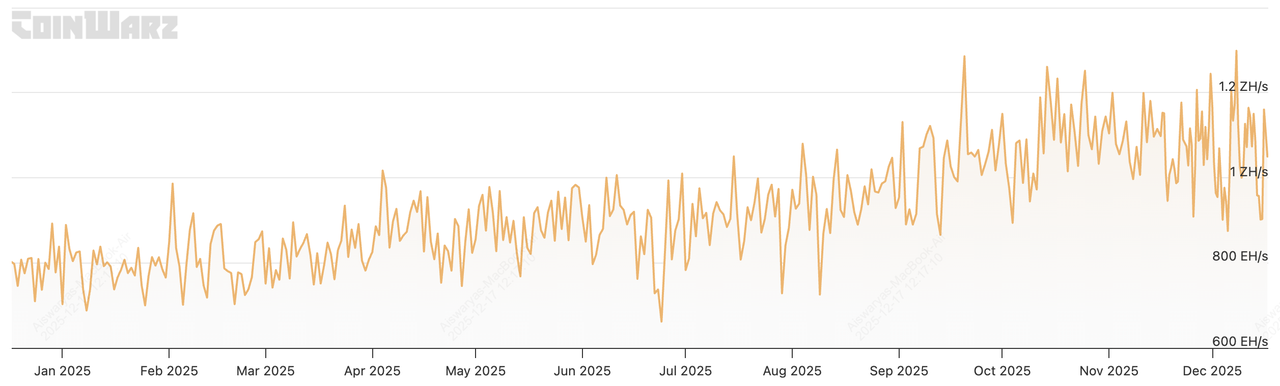
Bitcoin mining hashrate | Source: CoinWarz
In 2026, PC Bitcoin mining is almost never profitable, and understanding why becomes much clearer once you look at the numbers behind modern mining economics.
Industrial mining firms, those running warehouses full of hydro-cooled ASIC machines, estimate that their all-in cost to produce 1 BTC (electricity + hardware + maintenance + depreciation) can reach $120,000–$130,000 per Bitcoin, depending on power prices and machine efficiency. Meanwhile, Bitcoin often trades in the $90,000–$95,000 range, meaning even large, professional miners can slip into losses when BTC price drops or difficulty rises.
This is despite having major advantages that home PC users don’t:
• Ultra-efficient ASIC miners producing 200–400 TH/s, versus a GPU producing a few MH/s or GH/s.
• Industrial electricity rates as low as $0.05–$0.06/kWh, far cheaper than residential power in most countries.
• Purpose-built cooling systems, reducing heat-related inefficiency and equipment wear.
When industrial miners with cheap electricity and top-tier hardware struggle to stay profitable, a home PC, running at perhaps 0.000001% of the network hash rate, has virtually zero chance of mining enough BTC to cover even its electricity bill.
Bitcoin Mining in Numbers: An Example
A modern ASIC like the WhatsMiner M63S earns an estimated $14.31/day in mining revenue, but spends $8.66/day in electricity at $0.05/kWh, leaving around $5.65/day profit. A gaming PC mining SHA-256, by contrast, earns pennies to a few dollars per month while consuming hundreds of watts of power 24/7.
So Why Do BTC Mining PC Tutorials Still Exist?
Because PC mining is still useful and fun, just not profitable:
• It’s an excellent educational tool for beginners who want to understand how Proof-of-Work mining works.
• Mining software like NiceHash lets you rent out your GPU power and receive tiny BTC payouts, which can feel rewarding for newcomers.
• You can mine other less competitive PoW coins that GPUs handle better, then convert them into BTC later.
Bottom Line for Beginner BTC Miners
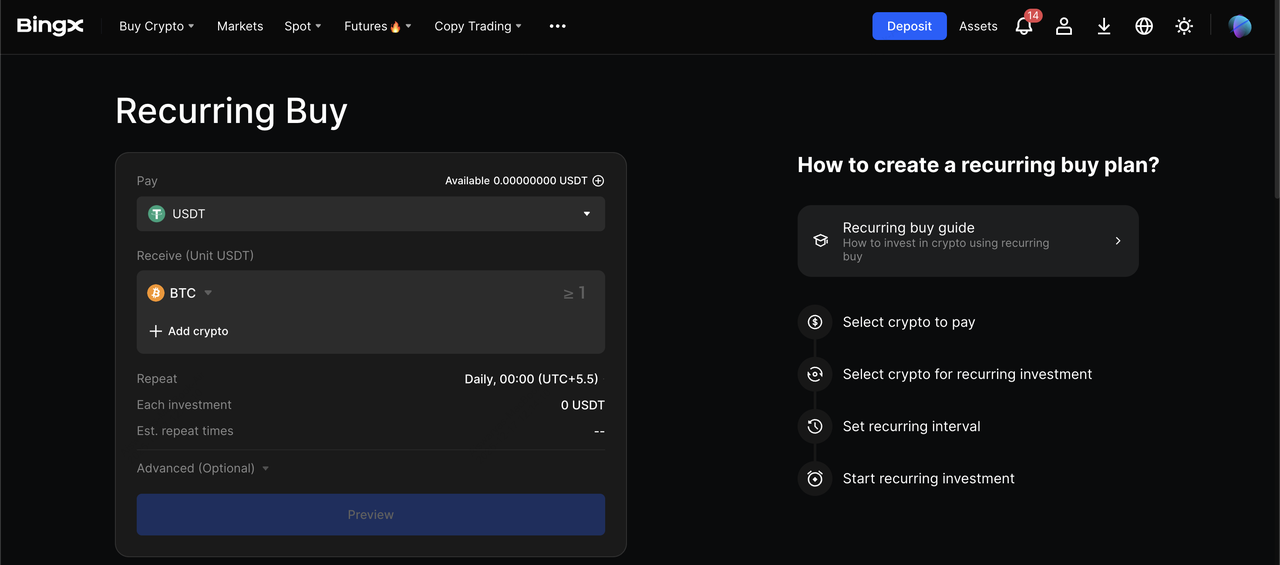
Set up Recurring Buy to dollar-cost average (DCA) Bitcoin buys
PC mining in 2026 is best viewed as a learning sandbox, not a real income strategy. If your goal is simply to accumulate Bitcoin, buying BTC directly or using Recurring Buy to DCA BTC on BingX is almost always more cost-effective than running a power-hungry mining program on your PC.
What Are the Different Ways to Mine BTC on Your PC in 2026?
When people say they mine Bitcoin on a PC in 2026, they are usually not mining actual BTC directly. Because the Bitcoin network operates at over 1,000 EH/s, no consumer CPU or GPU can meaningfully contribute to real SHA-256 mining. Instead, PC-based mining typically falls into three practical categories:
1. Using a Hashrate Marketplace Like NiceHash or Cryptex
Your PC mines GPU-friendly algorithms such as KawPow, Octopus, or Autolykos, and not Bitcoin’s SHA-256. NiceHash then automatically sells your GPU/CPU hash power to buyers and pays you in BTC based on your contributed hashrate. This method gives beginners small Bitcoin payouts - often a few cents to a few dollars per day, while shielding them from mining algo complexity.
2. Installing a PCIe “Plug-In ASIC” That Uses Your PC for Power and Monitoring
Some devices, similar to Magic Miner–style PCIe ASICs, fit into a GPU slot but contain a compact SHA-256 ASIC chip internally. They perform real Bitcoin hashing at rates far above a GPU (e.g., 5–20 TH/s), but still far below industrial machines that reach 200–400 TH/s. Your PC effectively becomes a controller dashboard, while the ASIC does the heavy computational work.
3. Using Your PC Only as a Controller for External ASIC Miners
In this setup, the actual mining rigs like Antminer, WhatsMiner, Avalon, etc., sit on shelves and generate hundreds of terahashes per second, while your PC simply configures pool settings, firmware, and monitoring tools. The PC contributes 0% of the hashing; it only manages the ASICs via a web panel or local network. This is how most small-scale or home ASIC setups operate, because modern miners cannot be run directly from a PC’s CPU or GPU.
If you’re hoping to earn meaningful Bitcoin from a standard PC, NiceHash-style mining is the only accessible option, but payouts are small and usually don’t cover electricity costs. This guide focuses primarily on that method, while also explaining when it makes more financial sense to skip mining entirely and simply buy Bitcoin or DCA weekly on BingX instead.
What Are the Essential Requirements for PC-Based Bitcoin Mining?
Even if your goal is just to experiment, you still need a basic setup:
1. A modern PC: Ideally with a mid- to high-end GPU and at least 16 GB of RAM.
2. Reliable internet: Stable, low-latency connection. Use wired Ethernet when possible.
3. Good cooling: Mining stresses your GPU and CPU 24/7. You must manage temperatures.
4. A secure Bitcoin wallet: So you can receive any payouts.
5. Mining software or marketplace app: NiceHash Miner, Cryptex Miner, or similar.
6. Legal clearance: Make sure mining is legal and doesn’t violate your landlord’s or dorm’s rules.
Important: Mining pushes your hardware hard. Expect higher electricity bills, louder fans, and faster wear on components.
How to Start Mining BTC on Your PC in 2026
Mining Bitcoin on a home computer no longer means solving SHA-256 directly; your PC instead participates in alternative ways that provide small BTC payouts or help you control real mining hardware.
Method 1: Mine via a Hashrate Marketplace Using Your PC
This is the easiest way for beginners to earn small BTC payouts using their CPU/GPU, even though your PC is not mining actual Bitcoin blocks.
Step 1: Confirm Legality and Check Electricity Costs
Make sure mining is legal where you live; several regions restrict or fine unauthorized mining, especially when electricity misuse is suspected. Check your residential power rate, typically $0.10–$0.20/kWh globally, and understand that marketplace mining at these prices is usually not profitable, but useful for learning.
Step 2: Set Up a Bitcoin Wallet
Create a BTC wallet where mining payouts will be sent (hardware wallets offer the best security). If you’re experimenting, mobile or software wallets are fine. You can also deposit mining payouts directly to your BingX BTC deposit address.
Read more: How to Set Up a Bitcoin (BTC) Wallet?
Step 3: Install a Mining App
Create an account on the mining app platform, such as NiceHash or Cryptex, and enable 2FA. Download the official mining clientand log in. Expect antivirus warnings, mining apps interact with hardware at a low level, so always download only from the official website.
Step 4: Benchmark Your Hardware
The mining client benchmarks your GPU/CPU on multiple algorithms, including KawPow, Octopus, Autolykos, etc.. It will show:
• Estimated BTC payout per day
• Watts consumed
• Profitability calculators using real-time market data
• You can also set worker names, auto-start options, or idle-only mining.
Step 5: Start Mining Bitcoin on PC
Press Start and your PC begins solving PoW tasks on whichever algorithm is most profitable at that moment. NiceHash sells your hash power to buyers and pays you BTC for your contribution. You can track:
• Hashrate
• GPU temperature
• Expected payout schedule
• Current power consumption
Step 6: Monitor Heat, Noise and Profit
Keep GPU temperatures under 80–85°C or per manufacturer guidelines. Compare your estimated revenue vs. electricity cost; many users will see negative daily profit, especially on mid-range GPUs. Treat any BTC earned as an educational bonus rather than mining income.
Method 2: Use a Plug-In “Magic Miner”-Style ASIC Inside Your PC
These devices look like GPUs and plug into a PCIe slot, but they are actually compact SHA-256 ASIC miners that perform real Bitcoin hashing.
Step 1: Install the ASIC Device
Devices similar to “Magic Miner” units draw around 100–150W, connect via PCIe for power, and use Wi-Fi/Ethernet for networking. Your PC acts only as a controller, not the miner it simply powers and configures the ASIC.
Step 2: Set Up the Mining Dashboard
Access the ASIC’s local dashboard in your browser. Enter:
• Your mining pool like ViaBTC, F2Pool, CKpool, etc.
• Your Bitcoin payout address
• Worker names or frequency settings if available
Step 3: Start Mining and Let the ASIC Run
Even with 5–7 TH/s, you make up only a microscopic share of Bitcoin’s 1,000+ EH/s global hashrate. Payouts will be small and solo mining is statistically near-zero, despite occasional news stories of lucky miners finding blocks. The value here is hands-on learning with SHA-256 hardware, not ROI.
Method 3: Use Your PC to Control External ASIC Miners
In this scenario, the real mining happens on separate ASIC machines, such as S19, M60, M63, Avalon, etc., while your PC acts as a monitoring/control station.
Step 1: Set Up Your ASICs on a Shelf or Rack
Modern miners deliver 150–400 TH/s but consume 3,000–7,200W, so they require proper electrical circuits, cooling, and ventilation. Your PC doesn’t mine, it only connects to the ASICs via LAN.
Step 2: Configure Mining Pools and Bitcoin Wallets
From your PC, open each miner’s dashboard and enter:
• Mining pool URL
• Worker credentials
• Bitcoin payout address
This determines where your ASICs send shares and payouts.
Step 3: Monitor Hashrate, Temperature & Profitability
ASIC dashboards and third-party apps let you monitor:
• Hashrate performance
• Watt usage
• Temperature and fan speed
• Pool statistics and earnings
This setup mirrors small-scale professional mining, but requires space, cooling, and electricity far beyond a typical home PC.
Bitcoin Mining Profitability: How to Calculate If Your PC Mining Setup Is Worth It
Before you leave mining software running 24/7, do this simple check:
1. Find your average power draw while mining: Use your mining dashboard or a wall-plug meter. Example: GPU + system = 350 W.
2. Convert to kWh per day: 0.35 kW × 24 h = 8.4 kWh/day.
3. Multiply by your electricity rate: If you pay $0.15/kWh → 8.4 × 0.15 = $1.26/day in power.
4. Check your expected mining revenue: Use the platform’s profitability calculator for your GPU model. If it says you earn, say, $0.60/day in BTC:
- Net daily result ≈ –$0.66/day (loss).
5. Decide your goal: If it’s pure learning, maybe you’re okay “paying” that loss. If it’s profit, you’ll likely conclude it’s better to just buy BTC.
What Are the Better Alternatives to Mining BTC on the PC?
If your main goal is to gain BTC exposure, not to tinker with hardware, consider these alternatives instead of PC mining:
1. Buy BTC directly on BingX. Use spot trading or Recurring Buy to DCA and accumulate BTC over time. This option requires no hardware, no noise, no overheating, no complex setups.
2. Use cloud mining cautiously. Rent hashrate from professional farms, understand counterparty risk, contract pricing, and difficulty changes.
3. Mine altcoins, then swap to BTC. Some GPUs can still mine PoW coins other than BTC more efficiently. You can mine those, then trade them into BTC on BingX. This still requires serious research and profitability checks.
4. Just learn, don’t mine Bitcoins. Run testnets, run a Bitcoin node, or explore Lightning Network. You can participate in the Bitcoin ecosystem without burning electricity for negligible rewards.
How to Move Mined Bitcoin to BingX and Trade It
Whether your BTC comes from NiceHash, a Magic Miner, or an ASIC, the process to trade it on BingX is similar:
1. Get your BingX BTC deposit address. Log into BingX. Navigate to Assets → Deposit → BTC. Choose the correct network. typically BTC mainnet.
2. Withdraw from your mining platform or wallet. In NiceHash, your pool, or your personal wallet, choose Withdraw/Send. Paste your BingX BTC address and confirm the network. Approve the transaction and wait for blockchain confirmations.
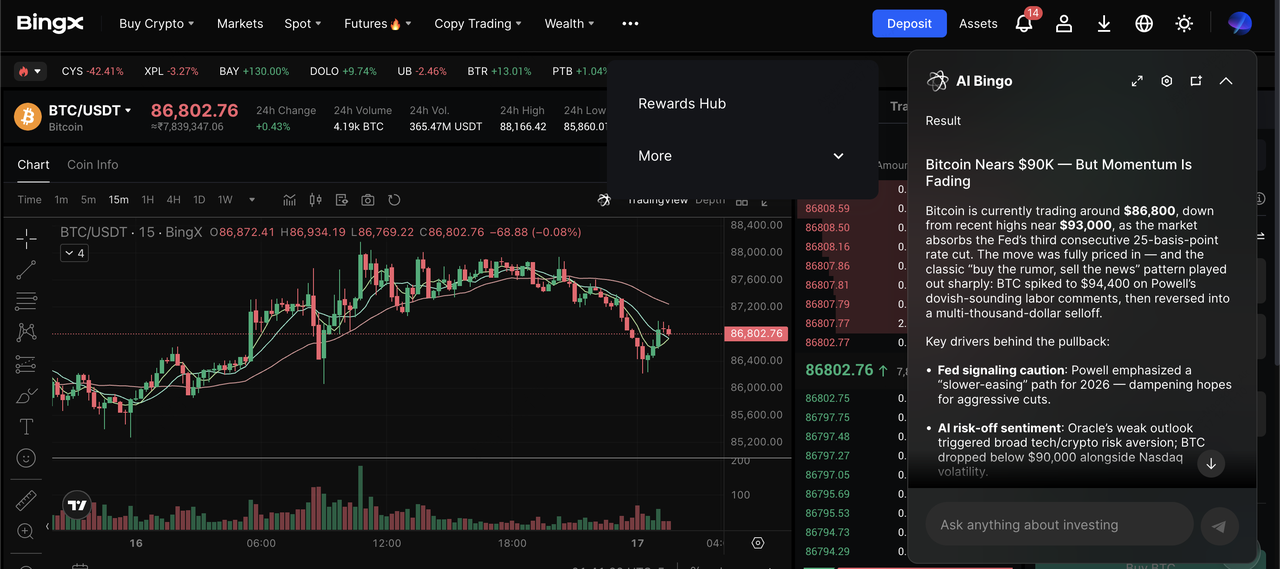
BTC/USDT trading pair on the spot market powered by BingX AI
3. Trade your BTC on BingX.
- Go to the BTC/USDT pair to sell BTC for USDT or buy more BTC.
- Or use futures to hedge your mining exposure by going long or short on BTCUSDT perpetual contract.
Convert to fiat-pegged stablecoins and use P2P or supported off-ramps if you want local currency.
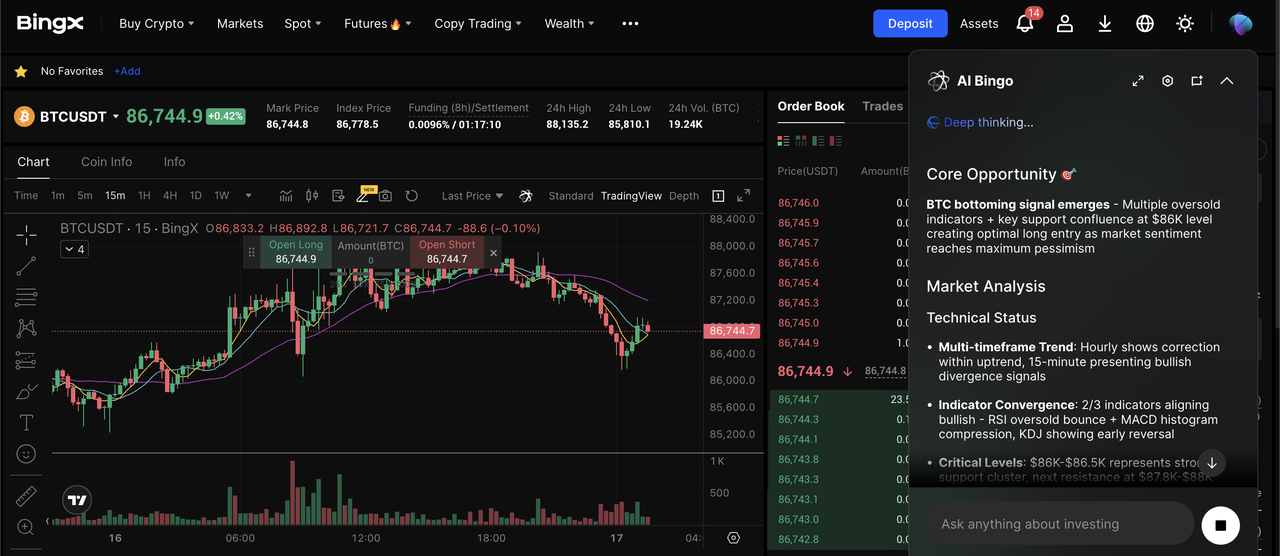
BTCUSDT perpetual contract on the futures market powered by BingX AI
4. Consider Recurring Buy for long-term stacking. Instead of, or in addition to, mining, you can set up a DCA plan on BingX to buy BTC automatically on a schedule that fits your budget and risk tolerance.
What Are the Top Risks of Mining Bitcoin on a PC in 2026?
Mining with a PC carries real risks that beginners often underestimate:
1. Hardware wear and overheating: Running your GPU at 100% load for long periods accelerates hardware degradation and, without proper cooling, can overheat or damage components like your GPU, SSD, and PSU.
2. Unprofitable electricity costs: At normal residential electricity rates, your energy bill often exceeds your mining revenue, and calculators may ignore extra costs like cooling and PSU inefficiency.
3. Malware and fake miners: Many so-called “free mining apps” contain malware that can hijack your PC or steal your wallet keys, so you should only download miners from verified official sites.
4. Legal and landlord issues: Some regions impose penalties for unauthorized mining or excessive power use, and mining in rentals, dorms, or shared housing may violate electricity or equipment policies.
5. Opportunity cost vs. simply buying BTC: After accounting for your time, electricity, and wear on hardware, you may end up with far less Bitcoin than if you had simply purchased BTC directly on BingX.
Conclusion: Should You Mine BTC on Your PC in 2026?
In 2026, PC-based Bitcoin mining is best viewed as a learning experience rather than a path to profit. With network difficulty exceeding 140T and global hash rate above 1 ZH/s, the mining landscape is dominated by industrial farms running ultra-efficient ASICs at energy rates far lower than typical households. Under these conditions, a home PC, even with a high-end GPU, cannot compete meaningfully with professional miners and will almost always lose money once electricity and hardware wear are counted.
PC mining still makes sense if your goal is to experiment, learn how Proof of Work operates, or test mining dashboards through platforms like NiceHash or small PCIe ASIC add-ons. But if your primary goal is to increase your Bitcoin holdings, it is almost always more effective to buy BTC directly or use a disciplined DCA strategy on BingX. Treat PC mining as a hands-on educational sandbox, while relying on smarter accumulation, risk management, and secure trading on BingX for long-term Bitcoin growth.
Related Reading
FAQs About PC BTC Mining in 2026
1. Can you still mine Bitcoin on a normal PC in 2026?
Yes, but you won’t be competitive. Industrial ASICs dominate the 1,000+ EH/s network, so a PC’s contribution is negligible and usually unprofitable.
2. How much can a gaming PC earn per day mining Bitcoin?
In many cases, after electricity, the answer is “negative.” Exact numbers depend on your GPU, kWh price, and market conditions, but most home setups lose money in fiat terms.
3. Is it better to mine Bitcoin or just buy it?
For most users, just buying BTC on BingX is simpler, less risky, and often yields more BTC for the same amount of money spent, especially once you factor in electricity and hardware wear.
4. Is PC mining bad for my hardware?
It stresses GPUs and CPUs continuously, creating heat and fan wear. With good cooling and conservative settings, you can reduce risk, but long-term 24/7 mining still shortens component lifespan.
5. Can I mine altcoins on my PC and convert to BTC?
Yes. Many miners use platforms like NiceHash or traditional pools to mine other PoW assets, then swap earnings into BTC. You can also trade your other mined PoW coins to BTC on BingX. However, you still need to check profitability and risks.
