BingX Fixed Risk makes it easier to manage risk in futures trading by automatically calculating your position size based on your stop-loss price and maximum acceptable loss. The feature helps traders determine how much to trade and set a stop-loss before entering the market, reducing the need for manual calculations.
Instead of choosing a position size first, traders can start by deciding how much they are willing to risk on each trade. However, the specified loss is an estimate rather than a guaranteed limit, as trading fees, slippage, and market conditions can affect the final outcome. This guide explains how BingX Fixed Risk works, how to use it step by step, how leverage affects trading risk, and the key considerations before placing a trade.
BingX Fixed Risk: 5 Essential Features for Futures Trading
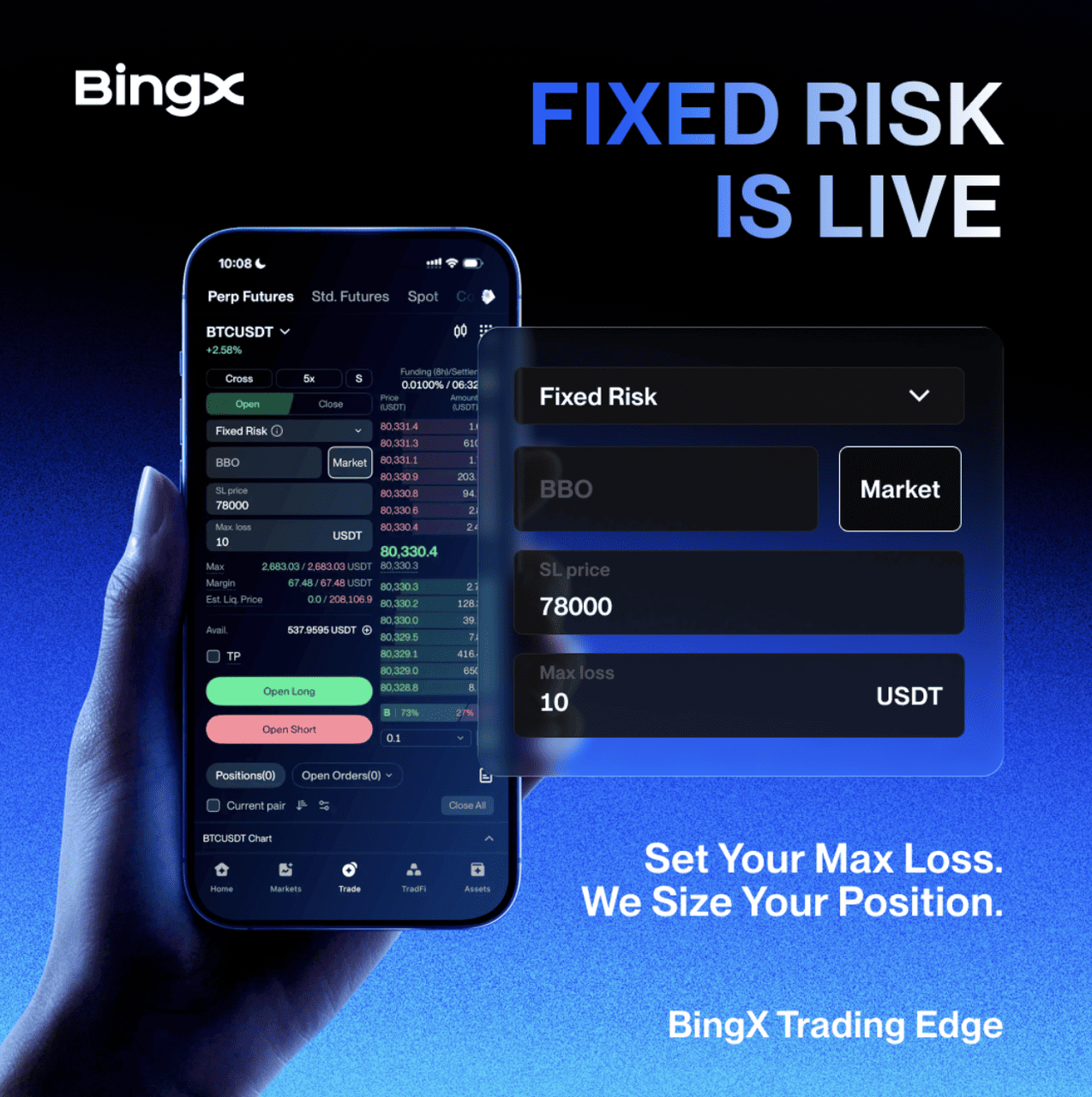
BingX Fixed Risk automatically calculates futures position size based on your stop-loss price and maximum acceptable loss. Here are five things to know before placing an order.
- Automatic position sizing: Enter your maximum acceptable loss and stop-loss price, and BingX calculates the opening amount based on the distance between your entry and stop-loss prices.
- Built-in stop-loss: Choose a market or limit entry, set a required stop-loss, and optionally add a take-profit. Fixed Risk supports opening both long and short positions in hedge mode.
- Position size calculation: Entering BTC at $100,000 with a stop-loss at $98,000 and a maximum acceptable loss of 100 USDT produces a calculated position of 0.05 BTC, before fees and funding.
- Leverage and liquidation: Changing leverage does not affect the calculated position size for the same inputs, but it changes the required margin and liquidation price. Higher leverage can bring liquidation closer to the entry price.
- Potential losses beyond your limit: Slippage, trading fees, funding costs, and market conditions can cause actual losses to exceed the amount entered. Fixed Risk helps plan trading risk but does not guarantee a maximum loss.
What Is BingX Fixed Risk?
BingX Fixed Risk is a futures order type that automatically calculates your position size based on your maximum acceptable loss and stop-loss price. Instead of deciding how much to trade first, you start by setting the amount you are willing to lose and the price at which you want to exit if the market moves against you. BingX then calculates the appropriate opening amount, helping you manage risk before entering a trade.
By default, Fixed Risk uses the current best market price to estimate your entry, although you can also specify a limit price. A stop-loss is required, while a take-profit is optional. As you adjust your entry price, stop-loss level, or acceptable loss, the system automatically updates the calculated position size, eliminating the need for repeated manual calculations.
Read More: What Are the Different Order Types Supported on BingX Futures and How to Use Them?
How Does BingX Fixed Risk Calculate Your Position Size?
BingX Fixed Risk divides your maximum acceptable loss by the difference between your entry and stop-loss prices to calculate your position size. A tighter stop-loss produces a larger position, while a wider stop-loss results in a smaller one.
Opening amount = Maximum acceptable loss ÷ |Entry price − Stop-loss price|
For example, suppose Bitcoin is trading at 100,000 USDT. You plan to open a long position with a stop-loss at 98,000 USDT and a maximum acceptable loss of 100 USDT. BingX calculates an opening amount of 0.05 BTC, worth 5,000 USDT.
|
Order Detail |
Example |
|
Entry price |
100,000 USDT |
|
Stop-loss price |
98,000 USDT |
|
Maximum acceptable loss |
100 USDT |
|
Calculated opening amount |
100 ÷ 2,000 = 0.05 BTC |
|
Position value |
5,000 USDT |
|
Illustrative margin at 10x leverage |
500 USDT |
For a short position entered at 100,000 USDT with a stop-loss at 102,000 USDT, the same 100 USDT acceptable loss produces 0.05 BTC. In both cases, the estimated price-related loss is 100 USDT if the entry and exit occur at the specified prices. Actual losses may exceed this amount due to slippage, trading and funding fees, or liquidation risk.
Read More: What Is Take-Profit and Stop-Loss (TP/SL) in BingX Spot Trading and How to Use Them?
BingX Fixed Risk vs. Manual Position Sizing: What's the Difference?
Both Fixed Risk and manual position sizing use the same relationship between acceptable loss, entry price, and stop-loss distance. With manual calculations, traders must determine the appropriate opening amount themselves and recalculate it whenever their trading parameters change. BingX Fixed Risk automates these calculations and incorporates the required stop-loss into the order setup, making it easier to adjust a trade before execution.
|
Step |
Manual Calculation |
BingX Fixed Risk |
|
Calculate position size |
Calculate the amount using the planned loss and stop-loss distance. |
Automatically calculates the opening amount from your inputs. |
|
Set a stop-loss |
Manually enter stop-loss settings when preparing the trade. |
Includes the required stop-loss in the order settings. |
|
Adjust the order |
Recalculate the amount when relevant inputs change. |
Automatically updates the calculated amount as parameters change. |
The main advantage of Fixed Risk is convenience and consistency. Traders can plan their acceptable loss, review the calculated position size, and adjust their order without repeating the calculations manually. However, both methods remain subject to the same market risks, including slippage, trading fees, and liquidation.
Read More: Stop-Loss vs. Stop-Limit Orders: How to Manage Risk in Crypto Trading
How to Use Fixed Risk on BingX: A Step-by-Step Guide
BingX Fixed Risk is available in the Perpetual Futures order panel on the BingX app and website. Before starting, update your app to version 5.5.0 or later and make sure your account is in hedge mode. Follow these three steps to set your maximum acceptable loss, calculate your position size, and place an order.
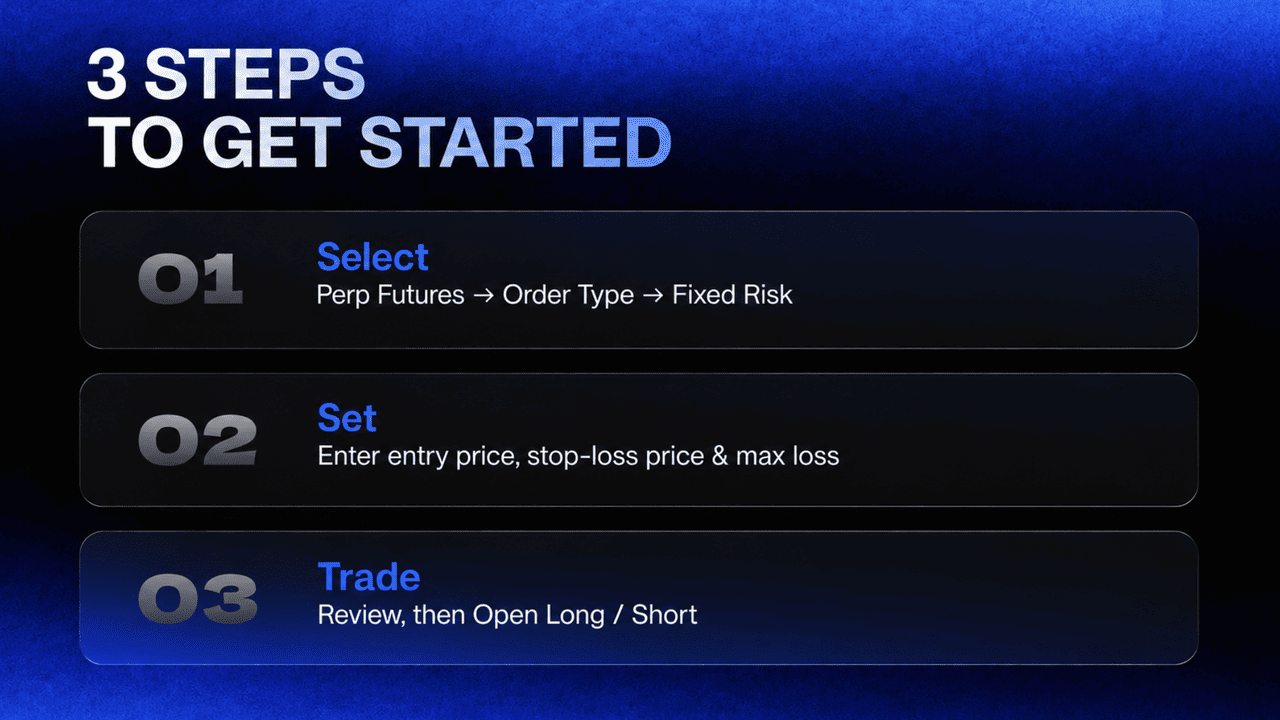
Step 1: Select Fixed Risk
Open BingX Perpetual Futures and select Fixed Risk from the Order Type menu. Its location varies depending on the trading interface:
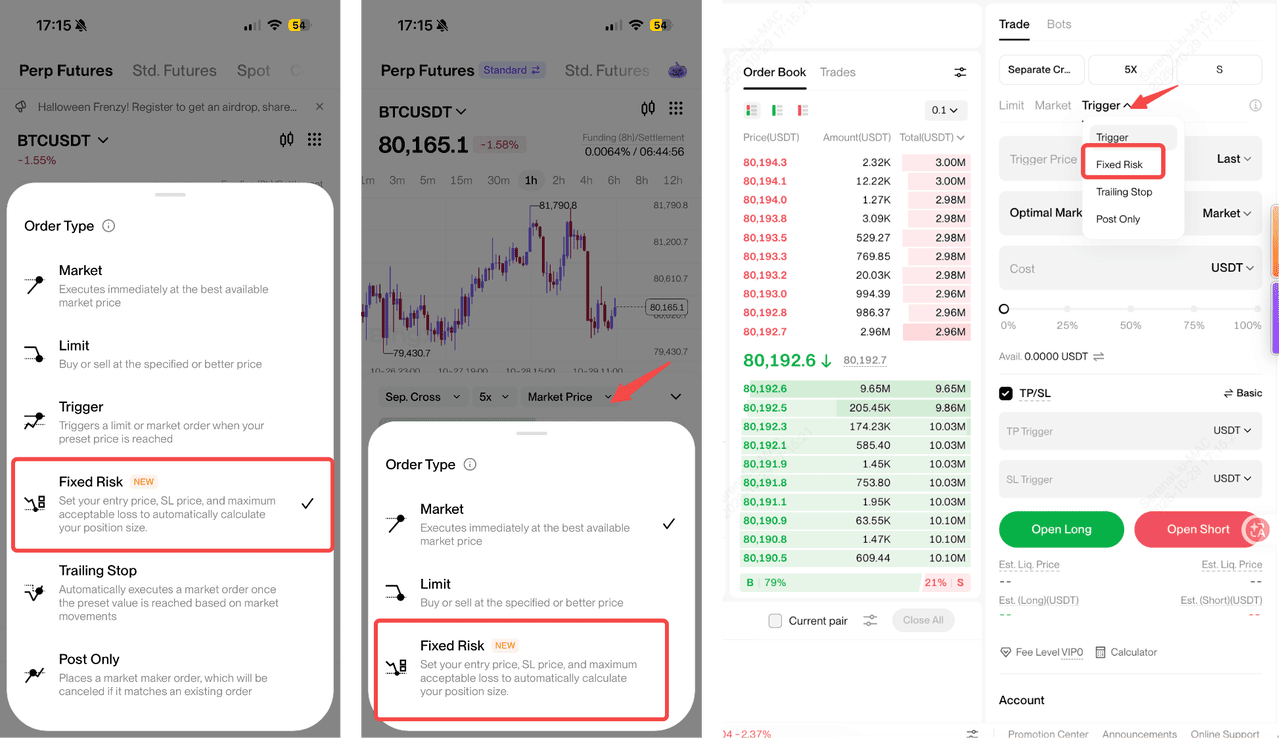
- App Pro: Perpetual Futures → Order Type → Fixed Risk, below Trigger Order.
- App Lite: Perpetual Futures → Order Type → Fixed Risk, below Limit Order.
- Web: Perpetual Futures order panel → Order Type → Fixed Risk, below Trigger Order.
Step 2: Enter Your Trade Parameters
Choose a market entry, which is selected by default, or disable the market-price option to enter a limit price. Then complete the following settings:
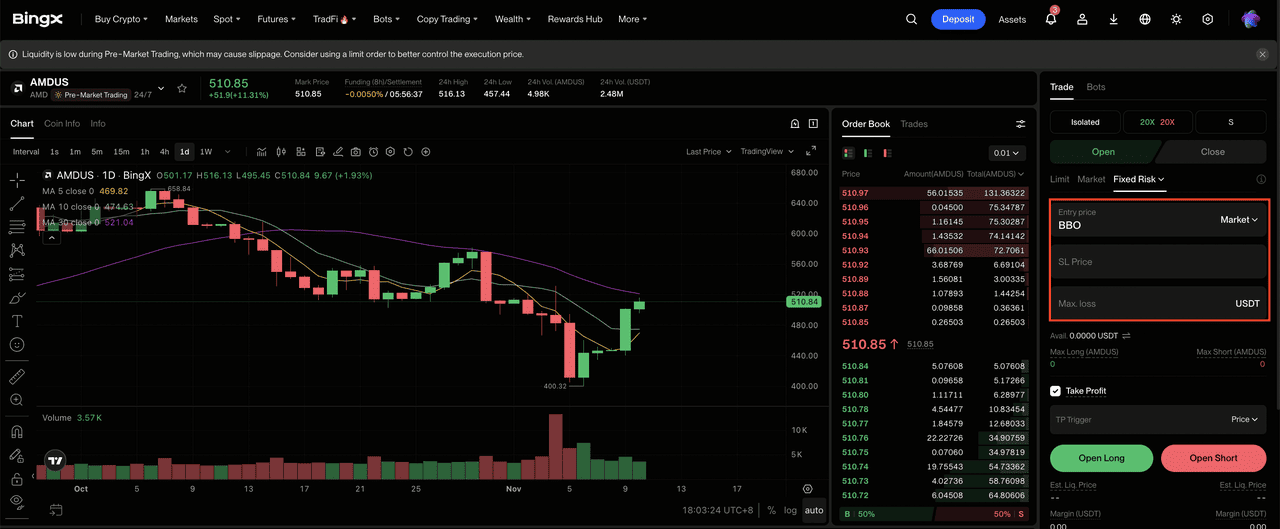
- Stop-loss price (required): Set the price at which you want to exit if the market moves against your position.
- Maximum acceptable loss (required): Enter the amount in USDT you are willing to risk on the trade.
- Take-profit (optional): Set a profit target using a price, ROI, or PnL amount.
BingX automatically calculates the opening amount based on your inputs. For long positions, the stop-loss must be below the entry price; for short positions, it must be above.
Step 3: Review and Place Your Order
Review the calculated opening amount, required margin, and estimated liquidation price. Adjust your settings or leverage if necessary, then click Open Long or Open Short and confirm your order. After execution, check your position and stop-loss settings.
Note: When you first select Fixed Risk, BingX displays a feature explanation with examples. You can select Don't Show Again to disable the automatic prompt or click the ⓘ icon next to the order type to review the explanation anytime.
Will Leverage Affect BingX Fixed Risk?
Yes. Leverage affects the required margin and liquidation price, but not the calculated position size or planned loss. For example, a 5,000 USDT position requires approximately 500 USDT at 10x leverage or 250 USDT at 20x leverage. Higher leverage generally brings liquidation closer to the entry price, increasing the risk of liquidation before the stop-loss is triggered.
To reduce this risk, keep your stop-loss before the estimated liquidation price and adjust leverage if necessary. Actual losses may still exceed the planned amount due to slippage, fees, and market conditions.
5 Risks to Consider When Using BingX Fixed Risk
BingX Fixed Risk helps traders plan their position size and acceptable loss, but it does not guarantee a maximum loss. Market conditions, execution costs, and changes to existing positions can affect the final outcome. Five key risks include:
- Actual execution prices may differ from estimates: Entry and exit prices can change during volatile markets, causing slippage. Stop-loss orders may also fail to trigger or execute as expected during extreme market conditions or system disruptions.
- Trading fees can increase your total loss: Fixed Risk calculations exclude trading and funding fees, which can cause actual losses to exceed the amount entered.
- Liquidation can occur before your stop-loss: Higher leverage can bring liquidation closer to the entry price. Review your margin and estimated liquidation price before placing an order.
- Existing positions can change your overall risk: In hedge mode, opposite-direction positions remain separate, while new orders in the same direction may combine with existing positions, changing the average entry price and overall exposure.
- Adjusting your position can change your planned loss: Changing your position size or stop-loss after entry affects your risk exposure. Order-size limits and quantity rounding may also cause the calculated loss to differ from your original input.
Conclusion: Manage Futures Trading Risk With BingX Fixed Risk
BingX Fixed Risk helps futures traders manage risk by automatically calculating position size based on their stop-loss price and maximum acceptable loss. With support for market and limit orders, required stop-loss settings, and optional take-profit targets, the feature simplifies position sizing and helps traders plan their entries more efficiently.
Before placing an order, review the calculated position size, required margin, and estimated liquidation price. While Fixed Risk makes risk management more straightforward, actual losses may exceed the amount entered due to slippage, trading fees, and market conditions.
Risk Reminder: Futures trading involves leverage and can result in substantial losses. Stop-loss orders are not guaranteed to execute at the specified price, and liquidation may occur before a stop-loss is triggered. Product availability and trading rules vary by region, account, and contract.
Related Reading
- 2026 Guide to Risk Management on BingX Futures: Protect Your Capital with Professional-Grade Tools
- How to Get Started with Perpetual Futures Trading on BingX: A 2026 Beginner's Guide
- Cross Margin vs. Isolated Margin to Master Your Risk on BingX Futures: A 2026 Beginner's Guide
- What Is Liquidation in Crypto Futures Trading? How to Calculate Liquidation Price
- Crypto Futures Funding Rate Explained: How It Affects Longs, Shorts, and Trading Costs
FAQs About BingX Fixed Risk
1. What Is BingX Fixed Risk?
BingX Fixed Risk is a futures order type that automatically calculates your position size based on your stop-loss price and maximum acceptable loss. It also includes a required stop-loss to help manage trading risk.
2. Does BingX Fixed Risk Guarantee My Maximum Loss?
No. Fixed Risk uses your maximum acceptable loss to calculate position size, but actual losses may exceed this amount due to slippage, trading fees, funding costs, or market conditions.
3. Can I Use BingX Fixed Risk for Both Long and Short Positions?
Yes. Fixed Risk supports opening both long and short futures positions. For long positions, the stop-loss must be below the entry price; for short positions, it must be above.
4. Why Can't I Find Fixed Risk on BingX?
Make sure you are using the Perpetual Futures order panel in hedge mode and opening a new position. App users must update to version 5.5.0 or later. Availability may also vary by region and account eligibility.
5. Why Can't I Place an Order Using BingX Fixed Risk?
Orders may be unavailable due to insufficient balance, an invalid stop-loss price, liquidation risk, or order-size restrictions. Review the calculated position size, margin requirements, and error message before submitting.
6. What Happens if My Stop-Loss Distance Is Less Than 0.5%?
BingX displays a warning because normal market fluctuations may trigger a stop-loss set too close to the entry price. You can confirm the warning and proceed if all other order requirements are met.
