
BingX Stocks Trading gives eligible users access to U.S. stocks and ETFs using USDT or USDC from the same account used for crypto. Orders are executed through Alpaca Securities LLC, with securities held under its regulated custody structure. This makes it easier to add traditional market exposure alongside crypto without opening and managing a separate U.S. brokerage account.
This guide covers the full trading process, from enabling Stocks Trading and preparing funds to placing orders, reviewing positions, and selling. It also explains how fractional shares, market and limit orders, spreads, trading sessions, and T+1 settlement affect execution and access to sale proceeds.
Key Takeaways
Before placing a first stock order on BingX, it helps to understand how funding, order types, fractional shares, position tracking, and T+1 settlement work. These are the main points to know before getting started.
- Buy U.S. stocks and ETFs with USDT or USDC: Stock purchases can be funded with crypto already held on BingX, with orders executed through Alpaca Securities LLC and trades settled in USDC.
- Start from 5 USDC with fractional shares: Fractional investing makes it possible to buy part of a higher-priced stock instead of paying for a full share. The minimum purchase starts from 5 USDC or 0.0001 shares.
- Choose between market and limit orders: Market orders prioritize execution at the available market price, while limit orders provide more control over the price but may remain unfilled.
- Track positions and open orders separately: A submitted order only becomes a holding after execution. Positions, open orders, fills, and trading history can be reviewed separately within Stocks Trading.
- Selling and settlement follow different timelines: Shares can be sold after purchase, while sale proceeds generally become available for withdrawal after the T+1 settlement cycle.
What Is BingX Stocks Trading?
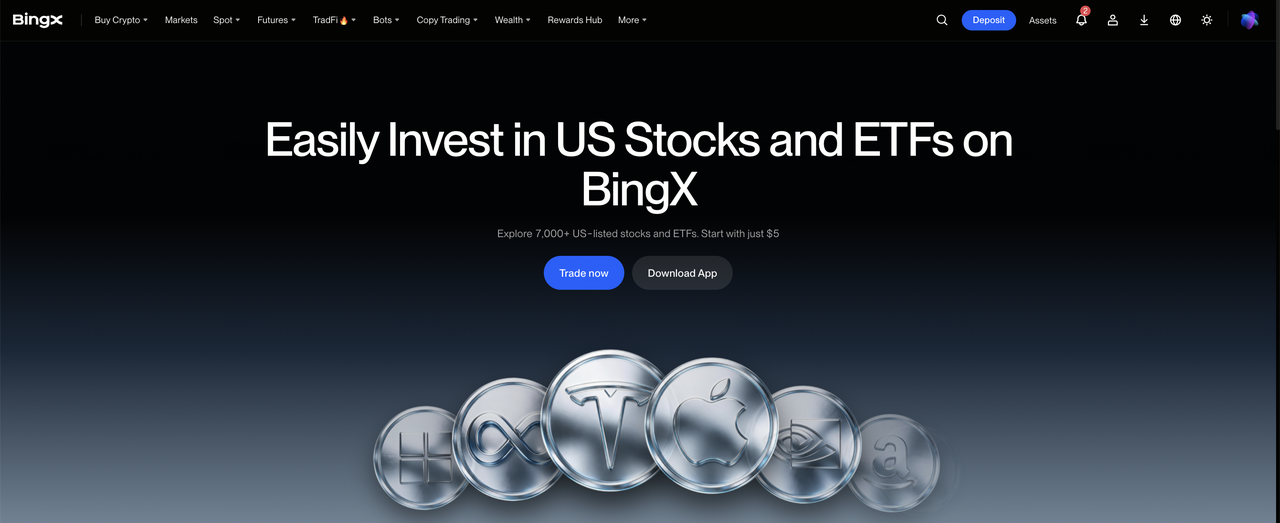
BingX Stocks Trading gives eligible users a straightforward way to add U.S. stocks and ETFs to their portfolio using USDT or USDC from the same BingX account. Orders are executed through Alpaca Securities LLC, with securities held under its custody arrangement. More than 7,000 U.S. stocks and ETFs are available, while fractional-share access makes it easier to start with smaller amounts and build exposure gradually.
Stocks Trading uses fully paid securities rather than leveraged derivatives, so there are no funding payments, margin requirements, or liquidation prices to manage. The value of each holding moves with the underlying stock or ETF, and eligible positions may also receive dividends or fund distributions according to the applicable rules. This gives users a simple way to diversify beyond crypto and build longer-term positions across individual companies, broad markets, and investment themes.
Read More: What Is BingX Stocks Trading? A Beginner's Guide to Trading U.S. Stocks and ETFs With Crypto
What Do You Need Before Trading U.S. Stocks on BingX?
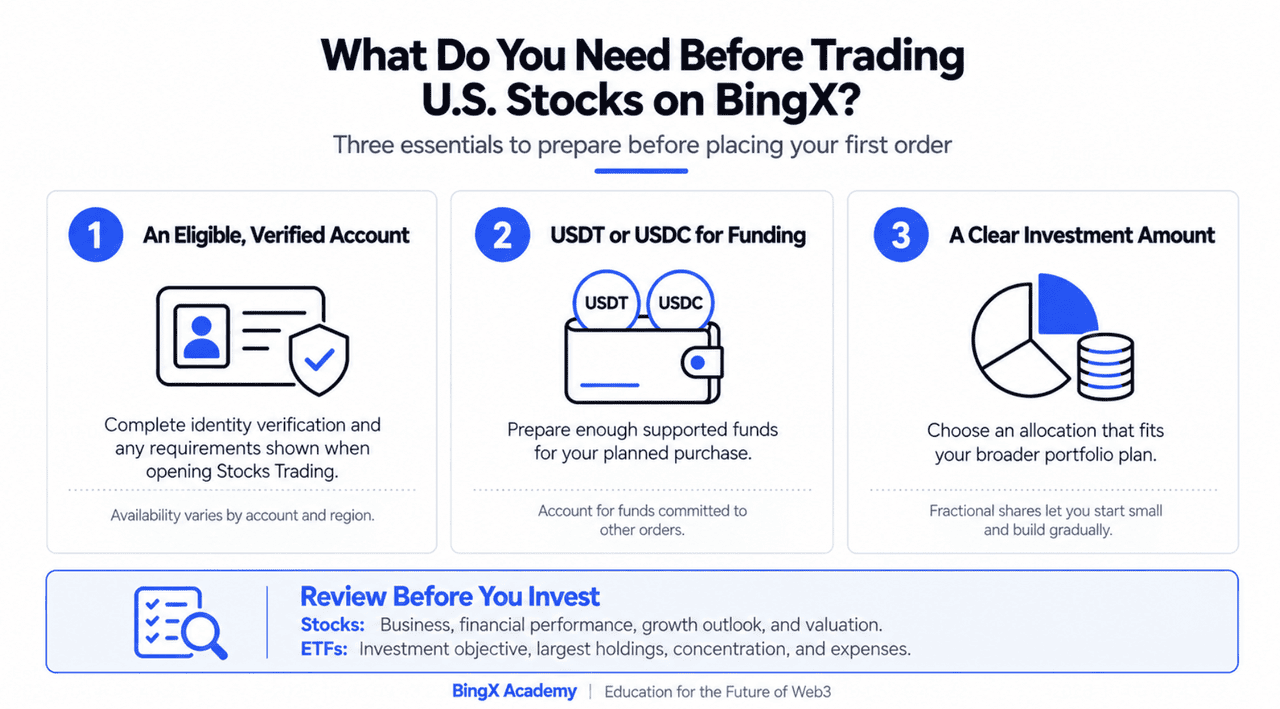
Getting started with U.S. stocks on BingX is straightforward. Before placing an order, make sure the account is eligible, supported funds are available, and the investment amount fits the broader portfolio plan.
- An eligible, verified account: Complete identity verification and any requirements shown when opening Stocks Trading. Product availability can vary by account and region.
- USDT or USDC for funding: Prepare enough supported funds to cover the planned purchase. Available balances should also account for any funds already committed to other orders.
- A clear investment amount: Decide how much capital to allocate before choosing a security. Fractional shares make it easier to start with a smaller amount and build a position gradually.
It is also worth reviewing the investment before placing an order. For individual stocks, focus on the company's business, financial performance, growth outlook, and valuation. For ETFs, check the investment objective, largest holdings, concentration, and expenses to understand the exposure being added to the portfolio.
How Much Does BingX Stocks Trading Cost? Fees, Hours, and Settlement Explained
BingX Stocks Trading offers zero-commission access, 24/5 U.S. market trading, and T+1 settlement. The main costs and timing factors to understand are spreads, ETF expenses, session liquidity, and when sale proceeds become available for withdrawal.
1. Fees and Trading Costs: Zero Commission, Spread-Based Pricing
BingX Stocks Trading charges no separate trading commission, with execution costs reflected in the spread between the buy and sell price. The spread can vary by security, order size, and market conditions, and may widen when liquidity is lower. ETFs can also carry ongoing fund expenses that are reflected in performance, while dividend withholding or other taxes may apply depending on the investment and individual circumstances.
2. Trading Hours: 24/5 Market Access
BingX Stocks Trading supports overnight, pre-market, regular, and after-hours sessions across the U.S. trading week, giving users more flexibility to trade around earnings, economic releases, and other market events. Liquidity can still vary between sessions, with overnight and extended-hours trading sometimes carrying wider spreads or less consistent execution. U.S. market holidays and daylight-saving changes can also affect session availability.
3. T+1 Settlement: Next-Business-Day Withdrawal
Stocks can be sold after purchase without waiting for settlement, but sale proceeds generally become available for withdrawal after T+1 settlement, meaning one business day after the trade date. This settlement period gives the broker and market infrastructure time to finalize the exchange of shares and cash after the trade is executed. For example, a Friday sale would normally settle on Monday if there is no U.S. market holiday. The sale itself is completed earlier, but the proceeds remain subject to settlement restrictions until that process finishes.
How to Buy and Sell U.S. Stocks and ETFs on BingX: A Step-by-Step Guide
BingX Stocks Trading lets eligible users buy and sell U.S. stocks and ETFs with USDT or USDC from the same BingX account. The process covers four main steps: enabling Stocks Trading, preparing funds, placing an order, and managing the position afterward.
Step 1: Sign Up, Complete KYC, and Enable Stocks Trading
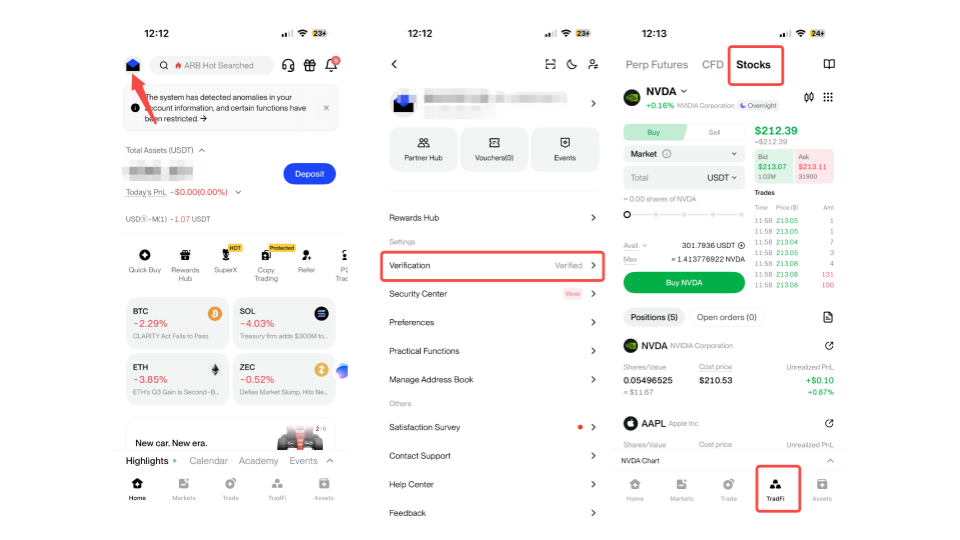
Sign up or log in to BingX, go to Profile > Identity Verification, and complete the required KYC steps. Then open TradFi > Stocks and accept the Stock Trading Risk Disclosure the first time Stocks Trading is accessed.
Step 2: Prepare USDT or USDC
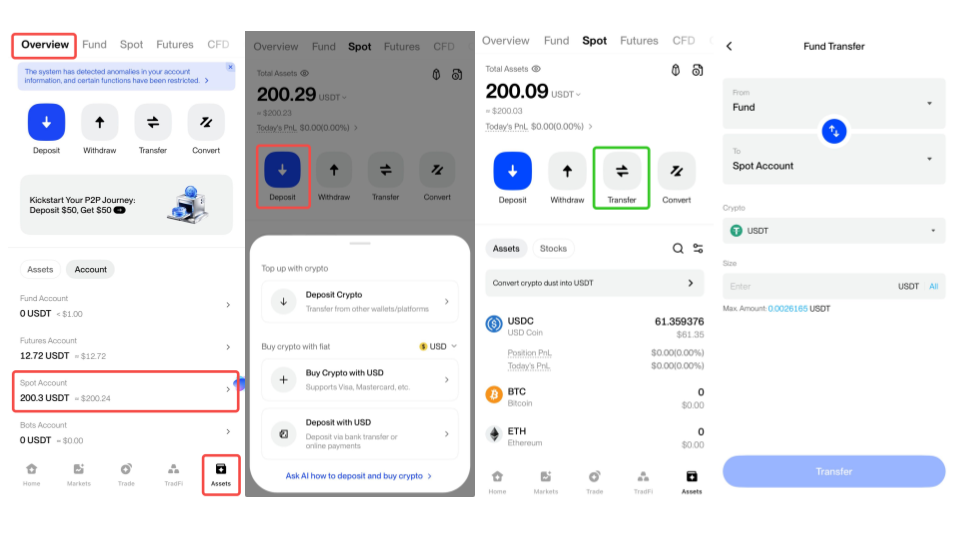
Make sure the Spot Account has enough USDT or USDC for the intended purchase. If needed, transfer funds from the Fund Account or Wealth Account. BingX also supports combined payment, using the Spot balance first and covering any shortfall from supported Fund or Wealth balances.
Step 3: Buy or Sell a Stock or ETF
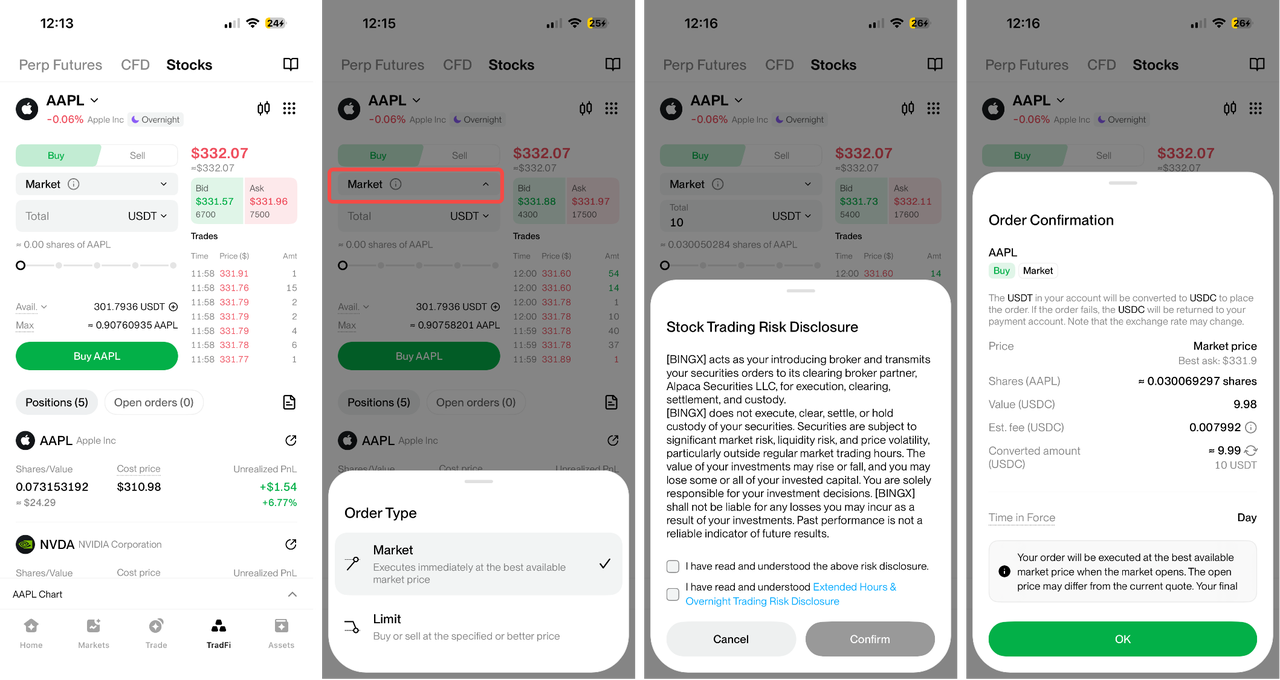
Go to Stocks > Market, choose a stock or ETF, and select Buy or Sell. Enter the purchase amount, share quantity, or amount to sell, choose the order type, review the details, and confirm. The minimum purchase is 5 USDC or 0.0001 shares.
- Market order: Executes at the available market price during supported trading hours. Orders placed outside market hours wait until the market reopens.
- Limit order: Executes at the specified price or better when sufficient liquidity is available. The order may remain open or fill only partially.
Stocks can be sold without waiting for T+1 settlement. T+1 affects when the sale proceeds become available for withdrawal rather than when the shares can be sold.
Step 4: Review Positions and Orders
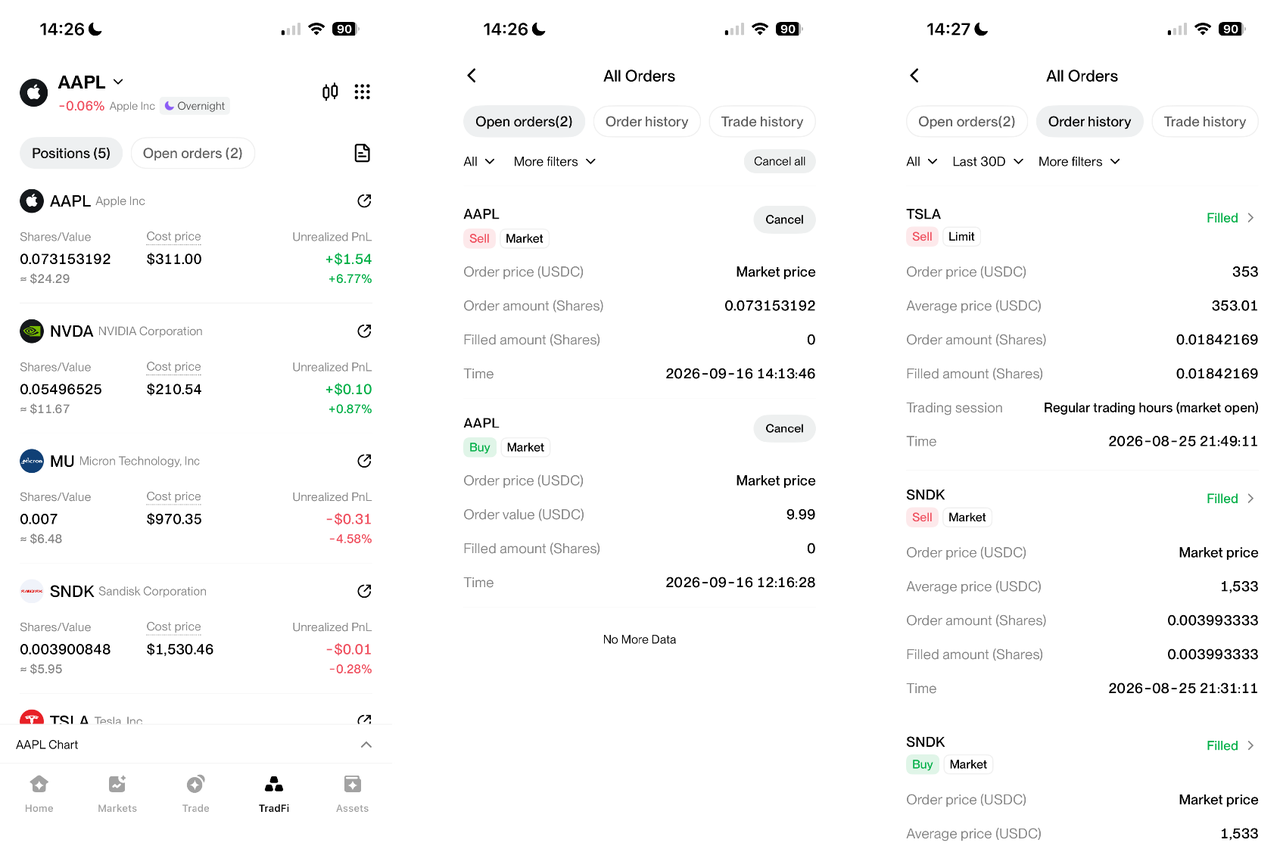
Open Stocks > Positions to view current holdings and P&L. Use All Orders to check open orders, completed trades, canceled orders, and order history.
After each transaction, three items are worth checking:
- Order status: Confirm whether the order is filled, partially filled, pending, canceled, or expired.
- Remaining position: Check the number of shares still held after a purchase or partial sale.
- Settlement status: Confirm when sale proceeds become fully settled and available for withdrawal.
Top 5 Mistakes to Avoid When Trading Stocks on BingX
A few simple checks can prevent common errors before and after placing an order.
- Choosing the wrong security or product: BingX offers several stock-related products, including Stocks Trading, tokenized stocks, and stock perpetuals. Check the company name, ticker, and trading section because each product follows different rules and creates different exposure.
- Investing more than planned: Fractional shares make smaller purchases possible, but position size still matters. Set the investment amount in advance and consider how much similar exposure is already in the portfolio.
- Ignoring spreads and session liquidity: Zero commission does not mean zero trading cost. Review the live quote, especially during overnight or extended-hours sessions when spreads may be wider.
- Treating a pending order as completed: Limit orders may remain open or fill only partially, while market orders placed outside supported hours can wait for the market to reopen. Check the order status before placing another trade.
- Forgetting about T+1 settlement: Shares can be sold immediately, but sale proceeds may not become withdrawable until the next business day. Plan withdrawals and transfers around the settlement cycle.
Final Thoughts
Trading U.S. stocks on BingX starts with a verified account, supported funds, and a clear investment choice. Once Stocks Trading is enabled, users can buy fractional shares with USDT or USDC, choose between market and limit orders, track positions, and sell through the same BingX account used for crypto. This makes it easier to add U.S. stocks and ETFs alongside an existing digital-asset portfolio without managing a separate trading setup.
The main advantage is having a simple, connected process from funding to execution and position management. Understanding the stock or ETF, keeping the allocation manageable, and checking spreads, order status, and T+1 settlement can help make each trade more deliberate. With those basics in place, BingX Stocks Trading provides a practical way to diversify beyond crypto and build longer-term exposure to U.S. markets.
Related Reading
- What Is BingX Stocks Trading? A Beginner's Guide to Trading U.S. Stocks and ETFs With Crypto
- BingX U.S. Stocks Trading vs. Stock Perpetuals: What Are the Key Differences?
- BingX U.S. Stocks Trading vs. Tokenized Stocks: What Are the Key Differences?
- Crypto vs. U.S. Stocks: Why Crypto Traders Are Turning to U.S. Stocks?
- What Is a Multi-Asset Trading Platform? A Guide to Trading Crypto and TradFi on BingX
- Top 7 U.S. Stocks to Watch in 2026 and How to Buy on BingX
- Top 8 U.S. ETFs to Invest for Beginners in 2026 and How to Buy on BingX
FAQs About Trading U.S. Stocks on BingX
1. Can I use USDT to buy U.S. stocks on BingX?
Yes. BingX Stocks Trading supports purchases with USDT or USDC, while trades settle in USDC. The payment currency can be selected on the order panel before the purchase is confirmed.
2. How much do I need to start trading stocks on BingX?
Fractional purchases start from 5 USDC, with a published minimum quantity of 0.0001 shares. This makes it possible to start with a smaller amount instead of buying one full share of a higher-priced stock.
3. Can I sell a stock on the same day I buy it?
Yes. Stocks can be sold after purchase without waiting for T+1 settlement, subject to supported trading sessions and order execution. T+1 mainly determines when the sale proceeds become available for withdrawal.
4. Why has my limit order not filled?
A limit order only executes at the specified price or better when sufficient liquidity is available. If the market does not reach that price, or only part of the order can be matched, the order may remain open or partially filled.
5. Can stock purchases on BingX be liquidated?
No. Fully paid Stocks Trading positions do not use leverage or margin, so there is no margin-based liquidation. The value of the holding can still fall substantially if the underlying stock or ETF declines.
6. Why can I see sale proceeds but not withdraw them?
The proceeds may still be going through T+1 settlement or another applicable account restriction. A completed sale does not necessarily mean the funds are immediately withdrawable, so the settlement status should be checked first.
