

Solana Seeker (SKR) is the native utility and governance token of the Solana Mobile ecosystem, designed to coordinate governance, incentives, and long-term sustainability across Solana’s crypto-native mobile stack. SKR officially launched at its Token Generation Event (TGE) on January 21, 2026, and is now available for spot trading on BingX via the BingX Spot Market.
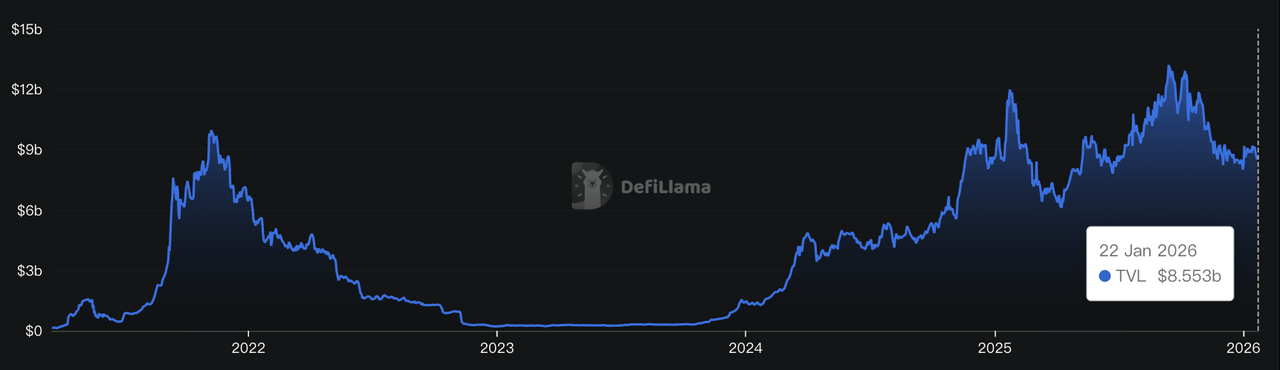
Solana's DeFi TVL | Source: DefiLlama
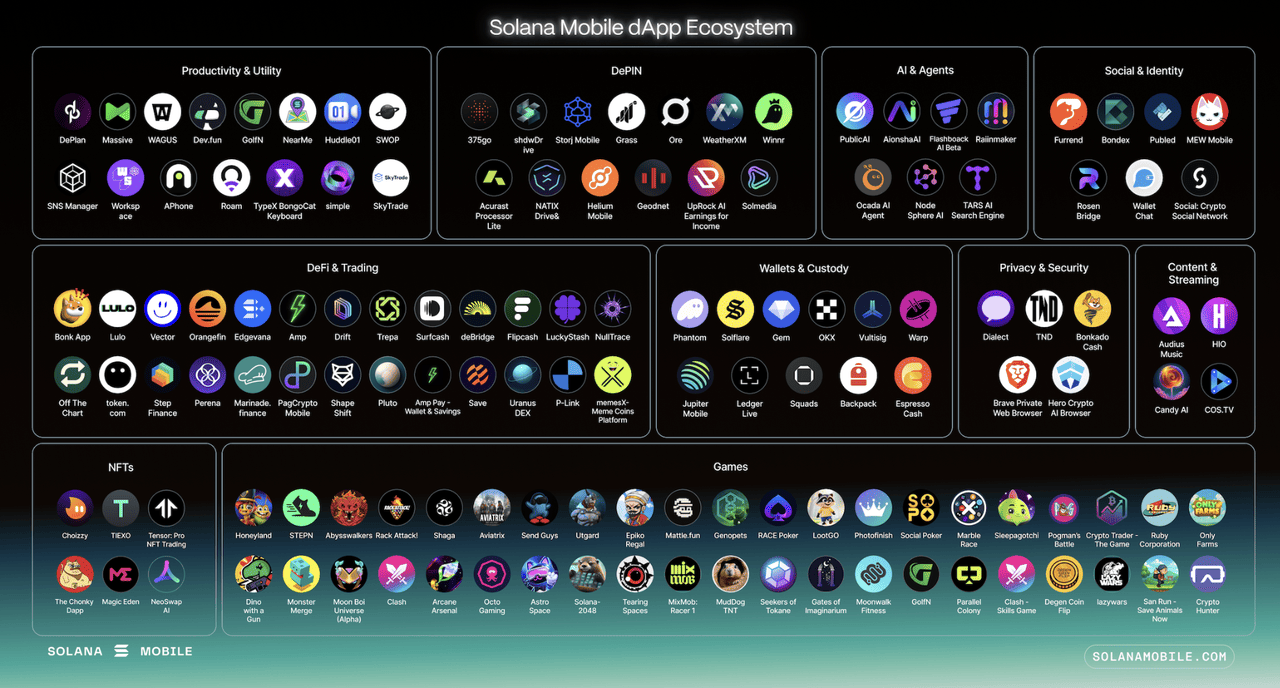
Built on Solana’s broader on-chain foundation, which held approximately $8.55 billion in total value locked (TVL) as of January 2026 according to DefiLlama, SKR is positioned as the economic backbone of a growing mobile Web3 ecosystem. With 175+ decentralized applications and over $100 million in on-chain economic activity already flowing through the Solana Mobile stack, SKR plays a central role in aligning users, developers, and governance participants.
This article explains what Seeker token is, who created it and when it launched, what SKR token is, its tokenomics, details about the airdrop, and strategies for maximizing your SKR allocation.
What Is the Solana Seeker Phone?
Source: Solana Mobile on X
Solana Seeker is a second-generation Web3 smartphone developed by Solana Mobile. It is built as a crypto-native device that integrates hardware wallet security, on-chain identity, and direct access to decentralized applications.
The phone includes a biometric-secured Seed Vault, native wallet support for self-custody, and Seeker ID, which links a wallet address, username, and Genesis Token into a single mobile identity. It also features a rebuilt Solana dApp Store for accessing DeFi, NFTs, gaming, DePIN, and AI applications. At the system level, Seeker uses TEEPIN, a security framework that enables trusted interactions between users, dApps, and hardware manufacturers without relying on centralized intermediaries. Private keys remain on-device, reinforcing self-custody as a core design principle.
Each device generates a non-transferable Genesis Token upon activation, granting access to ecosystem rewards and early mobile-native apps. Standard hardware specs include a 6.36-inch AMOLED display, 8 GB RAM, 128 GB storage, 5G, and WiFi 6. What differentiates Seeker is that Web3 functionality is embedded directly into the device rather than added through third-party apps.
With over 150,000 units shipped in the first production wave, the Seeker aims to build a global base of users who own their mobile identity and crypto assets with self-custody, using a device purpose-built for Web3 rather than adapted from traditional smartphone design. You can purchase the device directly from the Solana Mobile website or through authorized retail partners at launch prices of $450–$500.
Who Created Solana Seeker Phone and When Did It Launch?
The Solana Seeker smartphone was developed by Solana Mobile, a subsidiary of Solana Labs, which was founded by Anatoly Yakovenko and Greg Fitzgerald. Yakovenko, CEO of Solana Labs, also leads the Solana Mobile initiative and played an active role in Seeker’s development.
Seeker was announced in May 2025 as the successor to the Solana Saga phone, with plans to ship alongside the ecosystem’s native token, SKR. The first Genesis batch began shipping globally on August 4, 2025.
Compared with Saga, Seeker introduced a more refined hardware wallet, a built-in wallet interface, and a dedicated dApp store, reinforcing Solana Labs’ Web3-native mobile strategy. The timeline from announcement to shipment was only a few months, showing Solana Mobile’s push to deploy hardware and token infrastructure in parallel.
What Is Seeker (SKR) Solana Mobile Token and How Does It Work?
Source: SolanaFloor
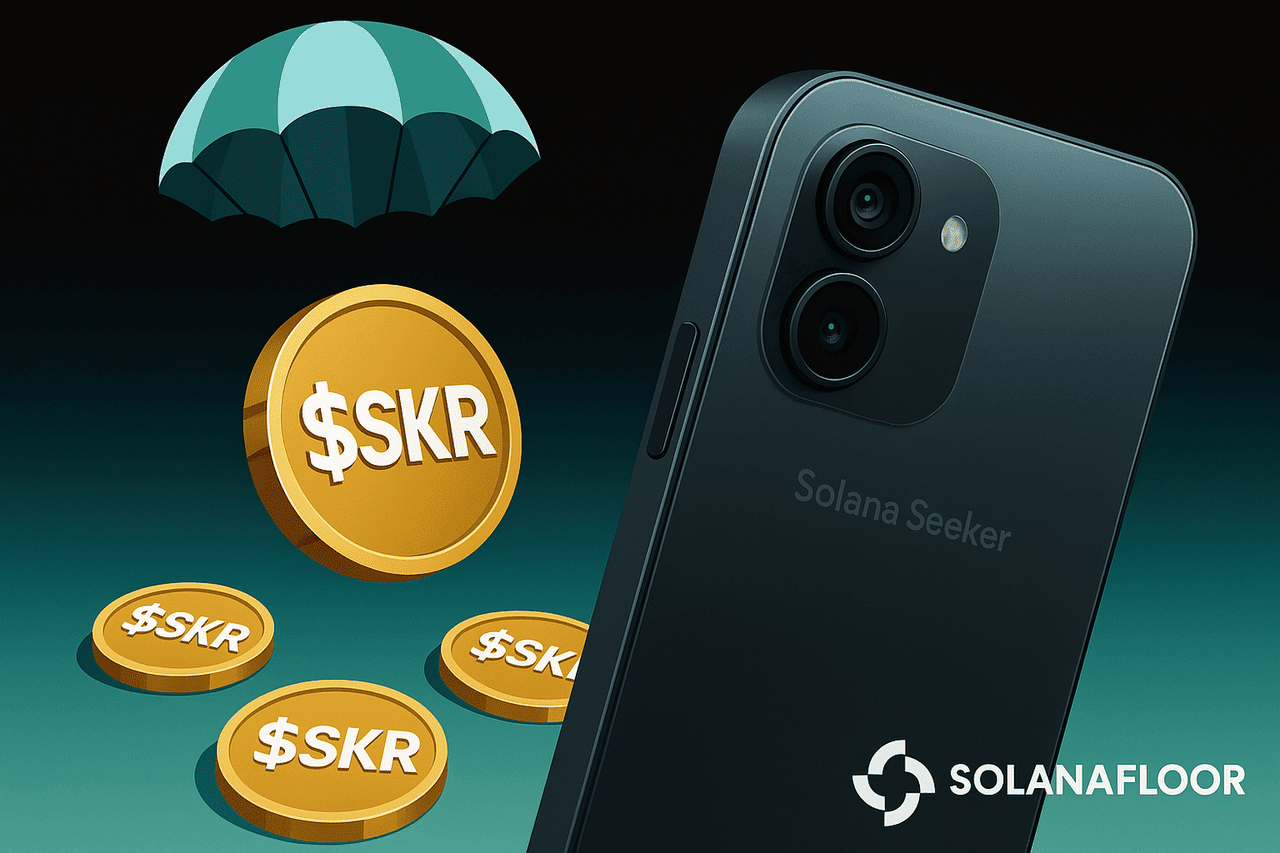
SKR is the native utility and governance token of the Solana Seeker ecosystem, the Web3 smartphone platform developed by Solana Mobile and built on the Solana blockchain.
SKR serves as the economic and coordination layer that connects mobile hardware, users, developers, and community governance into a token-based ecosystem. Instead of relying on a centralized app store or platform operator, Solana Seeker uses SKR to distribute ownership, incentives, and decision-making across its network participants.
What Are the Key Functions of SKR?
• Governance: SKR holders participate in ecosystem governance by delegating tokens to Guardians, who oversee device validation, app curation, and network standards.
• Staking: Users and builders can stake SKR to earn rewards and support the growth and security of the Solana Seeker ecosystem.
• Incentives: SKR is used to reward developers, users, and contributors through ecosystem programs and hardware-linked benefits.
• Device integration: The token is integrated with Seeker hardware features such as Seed Vault and on-chain identity, linking device ownership with on-chain access and rewards.
What Is SKR Tokenomics?
Source: SolanaMobile on X
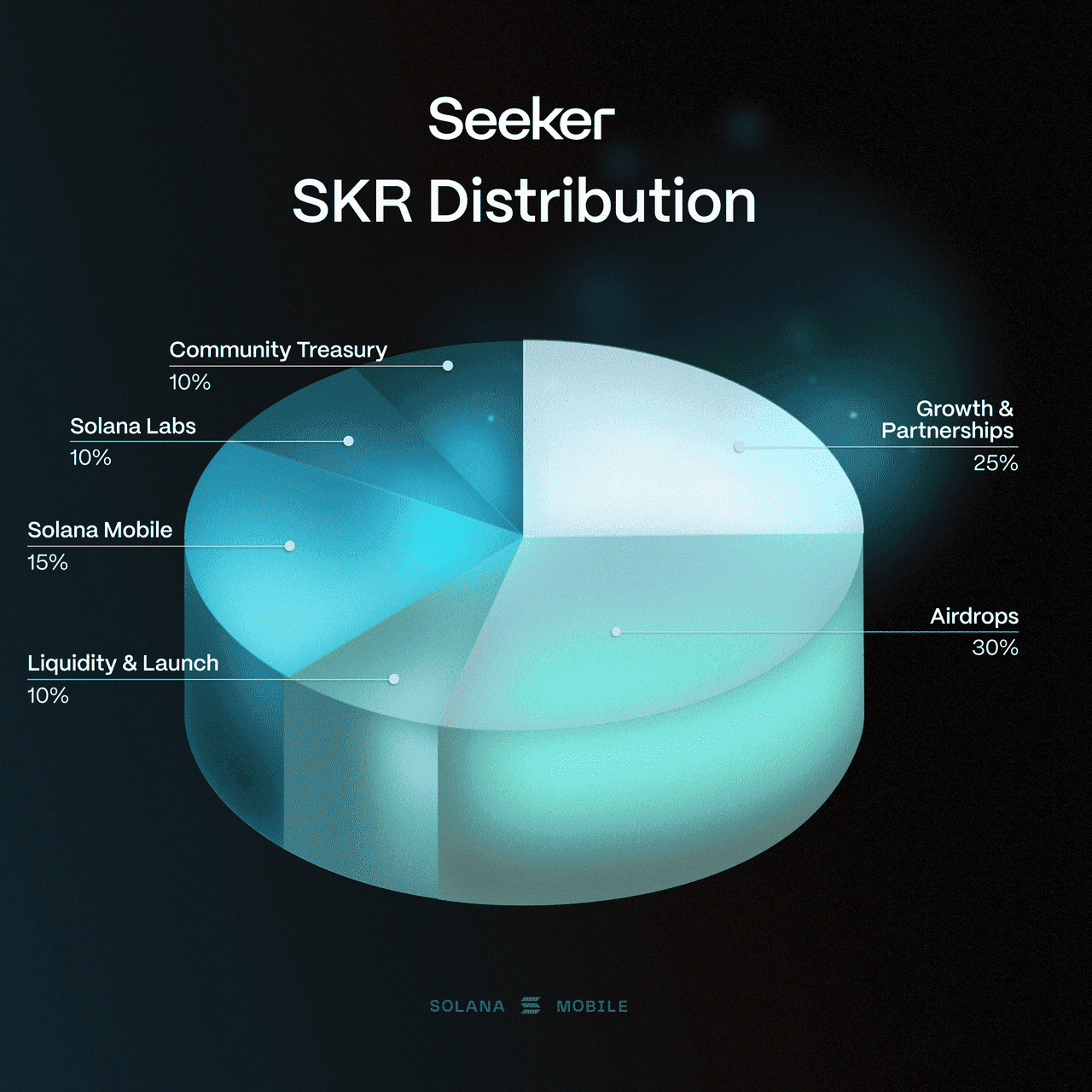
Total supply: 10 billion SKR (fixed)
SKR Token Allocation
• Airdrops: 30%. Fully unlocked at launch for early adopters, Solana Seeker phone holders, active dApp users, and ecosystem contributors.
• Growth and partnerships: 25%. 10% unlocked at launch, with the remainder vesting linearly over 18 months.
• Solana Mobile team: 15%. 12-month cliff followed by 36-month linear vesting.
• Liquidity and launch funding: 10%. Fully unlocked at the Token Generation Event.
• Ecosystem treasury: 10%. Fully unlocked at launch and governed on-chain.
• Founding entity: 10%. Generally attributed to Solana Labs, with a 12-month cliff and 36-month linear vesting.
Inflation Model
SKR uses linear inflation to incentivize early participation in staking and Guardian-based security, beginning with a 10% inflation rate in year one, decreasing by 25% each year, and stabilizing at a long-term terminal rate of 2%. This inflation model ensures that early stakers and device owners receive higher reward weights when the ecosystem is still growing, while gradually transitioning to a low, sustainable issuance schedule aligned with long-term mobile infrastructure security.
Staking and Governance
Staking and delegation to Guardians activate in January 2026, with 2-day epoch unbonding periods. Rewards are sourced from inflation, staking commissions, and mobile-native economic activity, aligning incentives across users, developers, and governance participants.
This tokenomics structure ensures early adopters and active ecosystem contributors are rewarded while setting long-term incentives for developers, users, hardware partners, and governance participants.
Read more: Top 8 Solana DeFi Projects to Watch in 2025
What and When Is the Solana Seeker (SKR) Airdrop?
Seek and you will find.
— Seeker | Solana Mobile (@solanamobile) December 3, 2025
SKR is coming in January 2026 🧵 pic.twitter.com/cwtlp8G8Zf
The SKR airdrop took place on January 21, 2026, alongside the token’s Token Generation Event (TGE), when 30% of the total 10 billion SKR supply was unlocked for distribution to qualifying participants. Eligible recipients will likely include Seeker owners, active users of the Solana Mobile dApp Store, developers building mobile-native applications, and possibly early community contributors as determined by Solana Mobile governance.
The airdrop aims to reward early adoption, stimulate ecosystem growth, and ensure broad distribution of SKR across hardware users and software contributors. Because the Genesis Token and user identity are bound to Seeker devices, holders of those devices are positioned to receive allocations, but precise criteria for participation have not been fully disclosed; users are encouraged to maintain active usage, link their Seeker ID in the Seed Vault Wallet, and engage with dApps to maximize eligibility before the airdrop goes live.
Learn more about how to claim the Seeker airdrop in our comprehensive guide.
How to Maximize Your $SKR Allocation in the Solana Seeker Airdrop
Source: SolanaMobile
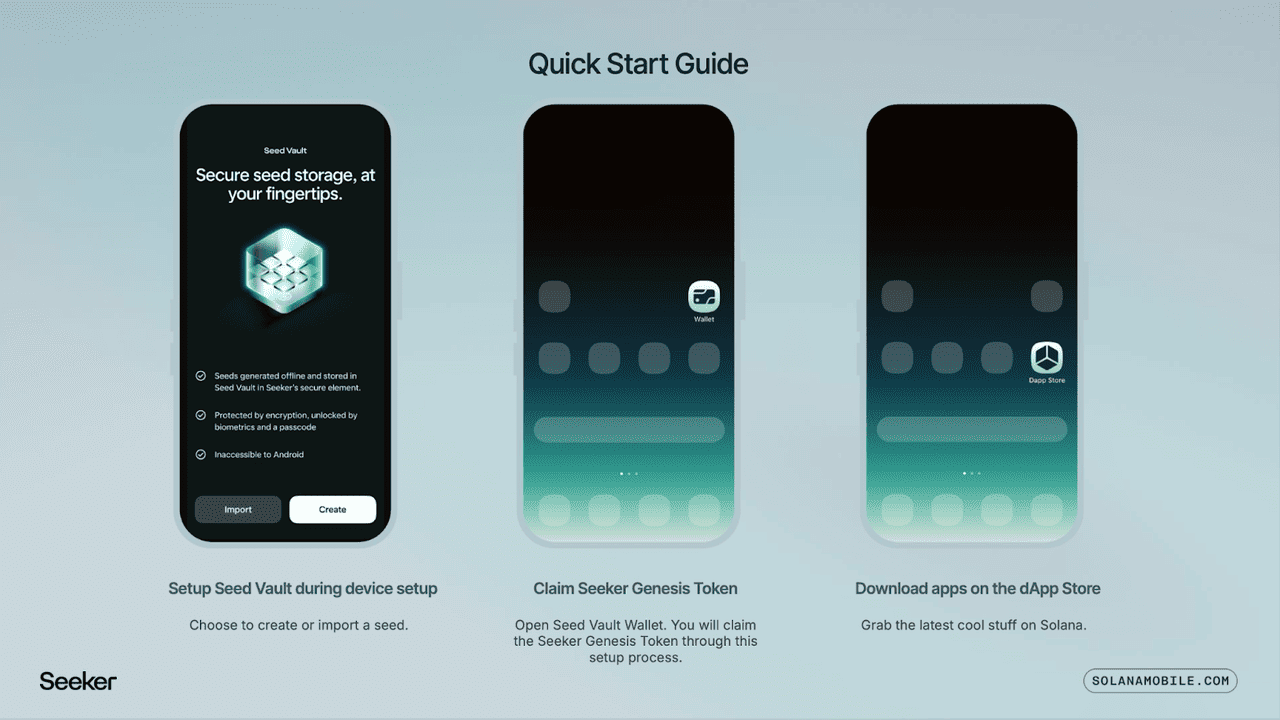
To maximize your SKR allocation you should first ensure your Seeker device is activated and your Genesis Token is registered in the Seed Vault Wallet. Next enable any usage tracking feature such as the "Seeker Activity Tracker" that Solana Mobile recently introduced to monitor on-chain activity, dApp interactions, and daily usage. Engage consistently with the Solana Mobile dApp Store by using decentralized apps, participating in decentralized finance (DeFi), DePIN, NFTs or gaming, and prefer apps that are marked as "featured" or "mobile native" since early activity may factor into airdrop eligibility.
Solana Seeker has an integrated marketplace with 100+ Solana-native apps across DeFi, NFTs, gaming, AI, and DePIN, with more launching during Seeker Season. Developers or users who contribute to ecosystem growth, for example, by building dApps, testing features, providing feedback, or referring other users, are likely to receive higher allocations under the growth and partnerships portion of the distribution pool. Keep your wallet active, maintain regular transactions, use new dApps weekly, and avoid long periods of inactivity, so your usage footprint remains visible. Finally, stay up to date with official announcements from Solana Mobile since some allocations may depend on on-chain snapshots or behavior metrics taken shortly before the airdrop launch in January 2026.
How to Buy Solana Seeker (SKR) on the BingX Spot Market
Solana Seeker SKR is the native token of the Solana Seeker ecosystem, officially launched at its Token Generation Event (TGE) on January 21, 2026. The token is now available for spot trading on BingX via the SKR/USDT pair.
SKR can be held, traded, transferred to self-custody wallets, or used for staking, governance, and other Solana Seeker ecosystem activities.
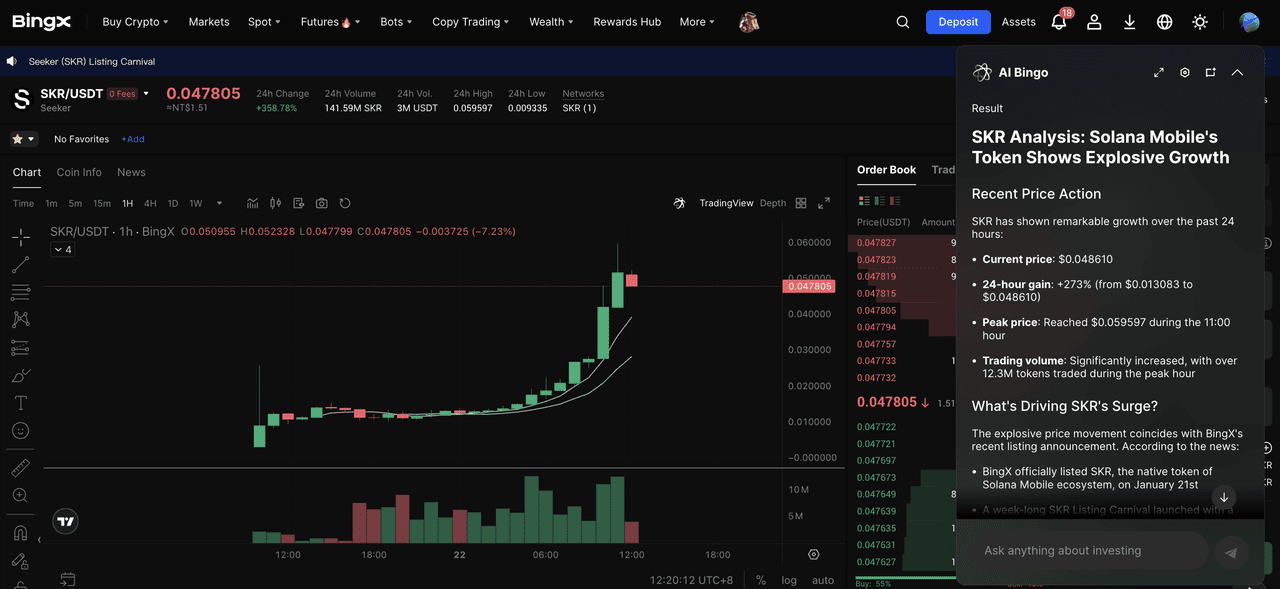
Trading SKR on BingX spot market
Step 1: Log in or Create a BingX Account
Log in to your existing BingX account. If you don’t have one, register BingX using an email address or mobile number. Completing identity verification (KYC) is required to access full trading features.
Step 2: Deposit Funds
Go to the Buy Crypto or Deposit section to add funds to your account. BingX supports multiple payment methods such as bank transfer, credit/debit card, and peer-to-peer (P2P) transactions.
Step 3: Find the SKR/USDT Pair
Navigate to the Spot trading section and search for SKR/USDT. Select the pair to open the trading interface. You can use BingX’s analysis tools to review price trends and trading indicators before placing an order.
Step 4: Place Your Order
Choose between a Market Order to buy SKR at the current price or a Limit Order to set your preferred entry price. Enter the amount of SKR you want to buy and confirm the transaction.
Conclusion
Solana Mobile’s Seeker phone and SKR token represent a move toward Web3-native mobile infrastructure, combining hardware wallet security, decentralized identity, dApp access, and a native economic layer designed to align users, builders, and hardware partners. With a fixed supply of 10 billion SKR, a 30% airdrop allocation, a staking roadmap activating Guardian delegation in January 2026, and more than 150,000 Seeker devices distributed globally, the ecosystem has established a strong foundation for decentralized mobile adoption.
Following its January 2026 Token Generation Event, SKR is now available for spot trading on BingX, giving users direct access to the Solana Seeker ecosystem. For those who activate a Seeker device, register a Genesis Token, and engage with the Solana Mobile dApp Store, SKR offers a way to participate in governance, staking, and the long-term growth of a mobile Web3 economy.
